
 3528
3528Con la crescente popolarità di TikTok a livello globale, sempre più utenti cinesi desiderano registrarsi e provare questa piattaforma di video brevi. Tuttavia, a causa delle restrizioni geografiche, gli utenti cinesi potrebbero incontrare alcune difficoltà nell'accesso diretto a TikTok. Questo articolo illustrerà in dettaglio i metodi per registrarsi a TikTok dalla Cina e condividerà alcuni consigli pratici per aiutarti a registrarti e utilizzare TikTok senza problemi.
1. Perché gli utenti cinesi hanno bisogno di metodi speciali per registrarsi a TikTok?
TikTok è la piattaforma internazionale di video brevi di ByteDance. Sebbene appartenga alla stessa azienda di Douyin in Cina, per motivi politici e tecnici, i servizi di TikTok non sono direttamente aperti agli utenti cinesi. Pertanto, gli utenti cinesi devono adottare metodi speciali per aggirare le restrizioni durante la registrazione a TikTok.

2. Metodi per registrarsi a TikTok dalla Cina
Di seguito sono riportati i passaggi dettagliati per aiutarti a completare facilmente la registrazione di un account TikTok:
1. Preparare un dispositivo adatto
- Scelta del telefono: si consiglia di utilizzare un telefono inutilizzato per evitare conflitti con l'account Douyin cinese.
- Ripristino alle impostazioni di fabbrica: ripristina il telefono alle impostazioni di fabbrica per assicurarti che non ci siano dati residui cinesi.
- Disattivare i servizi di localizzazione: disattiva la funzione di localizzazione nelle impostazioni del telefono per evitare che TikTok rilevi la tua posizione reale.
2. Modificare lingua e fuso orario
- Impostazioni lingua: imposta la lingua del telefono su inglese o sulla lingua del paese di destinazione.
- Impostazioni fuso orario: regola il fuso orario in base al paese di destinazione, ad esempio gli utenti statunitensi possono scegliere "Ora di New York".
3. Ottenere un ambiente di rete estero
Poiché TikTok ha limitato la rete cinese, è necessario utilizzare un ambiente di rete estero per accedervi normalmente. Qui si consiglia di utilizzare il servizio di rete dedicata TikTok all'estero fornito da Tuke. Tuke si concentra nel fornire agli utenti cinesi una connessione di rete estera stabile e veloce, garantendo una registrazione e un utilizzo fluidi di TikTok.
4. Scaricare l'app TikTok
- Utenti Apple: registra un Apple ID estero, accedi all'App Store e cerca e scarica TikTok.
- Utenti Android: scarica TikTok tramite Google Play Store o mercati di app di terze parti (come APKPure).
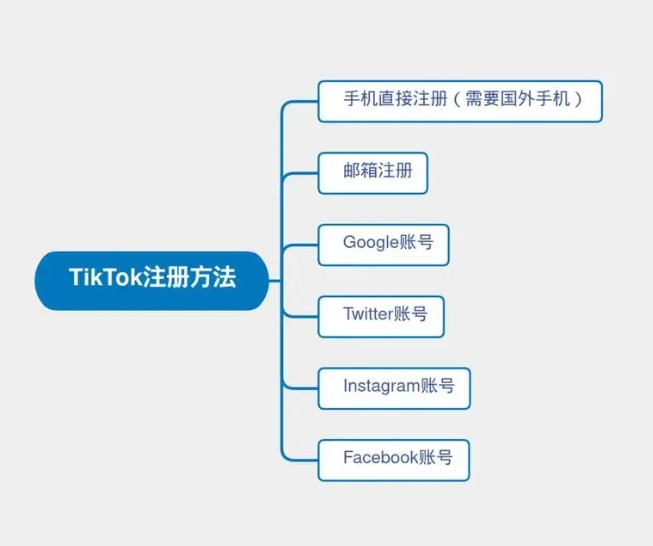
5. Registrare un account TikTok
- Registrazione con email: si consiglia di utilizzare email internazionali come Gmail o Outlook per la registrazione.
- Registrazione con numero di telefono: se hai un numero di telefono estero, puoi scegliere anche questa opzione.
- Accesso con account di terze parti: ad esempio account Google, Facebook o Twitter.
6. Completare le informazioni dell'account
- Impostare il nome utente: scegli un nome utente unico per facilitare ad altri utenti di trovarti.
- Caricare un avatar: utilizza un'immagine di alta qualità come avatar per migliorare la professionalità dell'account.
- Compilare la biografia: presentati brevemente per attirare più follower.
3. Precauzioni per la registrazione a TikTok
1. Evitare di utilizzare IP cinesi: TikTok rileva l'indirizzo IP dell'utente; se rileva un IP cinese, potrebbe limitare le funzionalità dell'account. Pertanto, assicurati di utilizzare la rete dedicata estera di Tuke per garantire che l'indirizzo IP si trovi nel paese di destinazione.
2. Non cambiare frequentemente account: cambiare frequentemente account potrebbe attivare il meccanismo di controllo del rischio di TikTok, portando al blocco dell'account.
3. Rispettare le regole della piattaforma: TikTok ha una moderazione dei contenuti piuttosto rigorosa; quando pubblichi contenuti, devi rispettare le linee guida della community per evitare violazioni.
4. Mantenere una rete stabile: utilizzare la rete dedicata estera di Tuke può evitare problemi di accesso fallito o caricamento lento dei video dovuti a fluttuazioni di rete.
4. Tuke: il miglior assistente per registrarsi a TikTok dalla Cina
Per gli utenti cinesi, la maggiore difficoltà nella registrazione a TikTok è la limitazione dell'ambiente di rete. Il servizio di rete dedicata TikTok all'estero fornito da Tuke è la chiave per risolvere questo problema. Tuke non solo fornisce una connessione di rete stabile, ma garantisce anche che il tuo indirizzo IP si trovi nel paese di destinazione, evitando di essere rilevato come utente cinese da TikTok.
Inoltre, la velocità di rete di Tuke è estremamente rapida, offrendo un'esperienza fluida sia per guardare video che per caricare contenuti. Se desideri avviare un'attività di e-commerce transfrontaliero o creare contenuti su TikTok, Tuke è senza dubbio un assistente indispensabile.

Seguendo i passaggi sopra descritti, puoi facilmente padroneggiare il metodo per registrarti a TikTok dalla Cina. La chiave è preparare un dispositivo adatto, modificare lingua e fuso orario, e utilizzare il servizio di rete dedicata estera di Tuke. Seguendo le istruzioni di questo articolo, potrai registrare con successo un account TikTok e iniziare a esplorare questa piattaforma globale di video brevi.
Se hai domande sul processo di registrazione o desideri saperne di più sulle tecniche di gestione di TikTok, non esitare a contattare il team di assistenza clienti di Tuke, che ti fornirà supporto e aiuto professionali.