5460
5460As Tuke's popularity continues to rise, more and more domestic companies are going overseas through Tuke. However, compared to the domestic market, there are still many knowledge gaps when it comes to opening cross-border stores overseas.
Recently, we have received many messages inquiring about cross-border store openings. With Ramadan approaching, many merchants are surely looking to take advantage of Ramadan marketing, so today we will explain the entire process of store operation for beginners.
Note: This process applies to both B2B and B2C merchants. Anyone joining Tuke Shop can follow it.

I.Tuke Shop Store Registration
1.Store Categories and Entry Requirements
Currently, Tuke Shop stores have launched inthe United States, United Kingdom, Indonesia, Thailand, Vietnam, Malaysia, the Philippines, and Singapore. Merchants can choose betweencross-border stores or local stores based on their sales needs.
However, in Indonesia and the US, only local stores are supported, while in the UK, Thailand, Vietnam, Malaysia, the Philippines, and Singapore, you can choose to open either a local store or a cross-border store.
Most stores require qualifications to join. Currently, entry is easiest in Southeast Asia if you follow the process, but the UK and US require meeting certain conditions.
US Entry Requirements as shown:
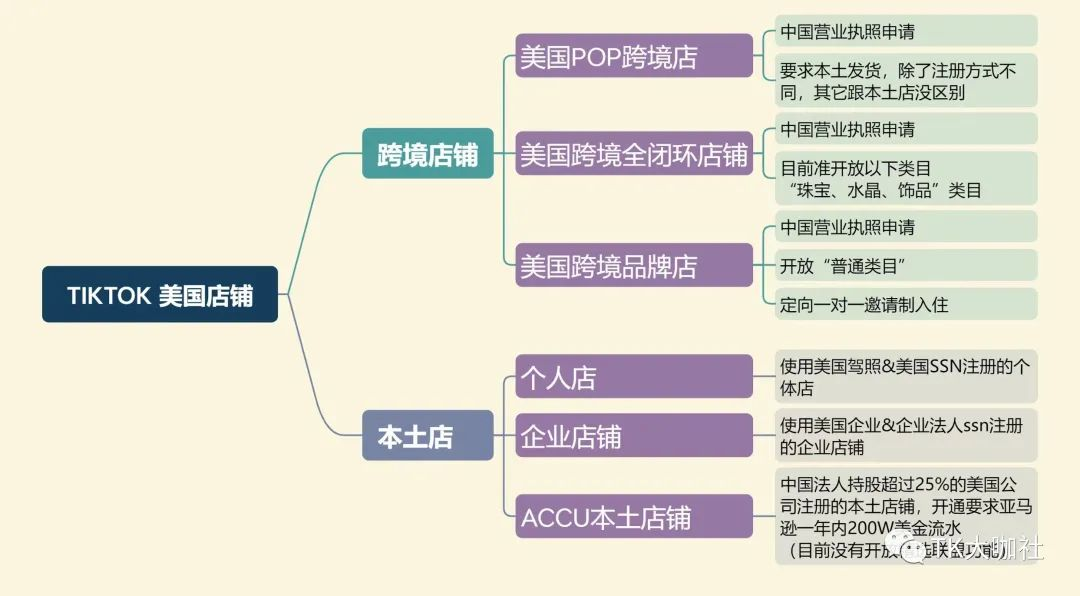
Image source: TK Big Shot Club
Required Documents for US Tuke Local Store Entry:
1. US phone number (SMS platform is fine)
2. Overseas email address
3. US local business license
4. Social Security Number (SSN) or Individual Taxpayer Identification Number (ITIN)
5. US local shipping (platform shipping, self-shipping, FBA shipping)
Required Documents for US Tuke ACCU Store Entry:
1. US phone number (SMS platform is fine)
2. Overseas email address
3. US local business license
4. Chinese legal representative holding more than 25% shares, requires federal tax number EIN
5. Amazon US site, single store annual turnover over $2 million (3 screenshots)
6. US overseas warehouse shipping (platform FBT shipping, merchant self-shipping, FBA shipping)
After discussing the US region, let's look at Southeast Asia.
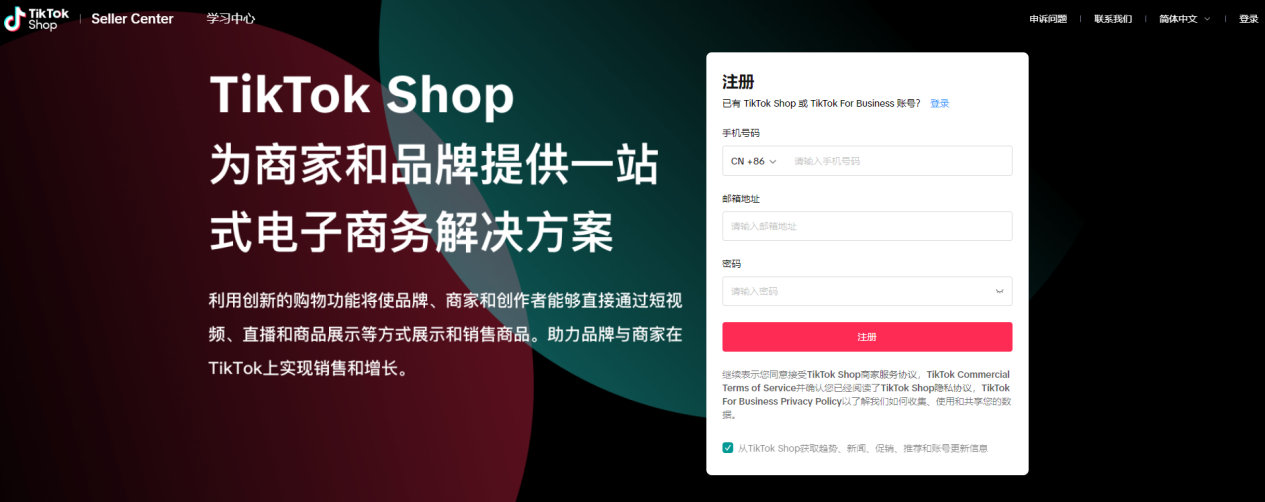
First, sellers who want to join Tuke Shop need to understand the Southeast Asian market trends and entry rules. At the same time, you need to register at the Tuke Shop Learning Center.
The account registered here is universal with Tuke Shop or Tuke For Business accounts. If you have already registered, you can log in directly.
Unregistered companies need to meet the following standards:
1. Business license with enterprise nature;
2. Mainstream third-party platform operation experience under the same license or legal representative;
3. Store overall rating greater than or equal to 4.3 or 90%.
Tuke Shop Store Entry Process:
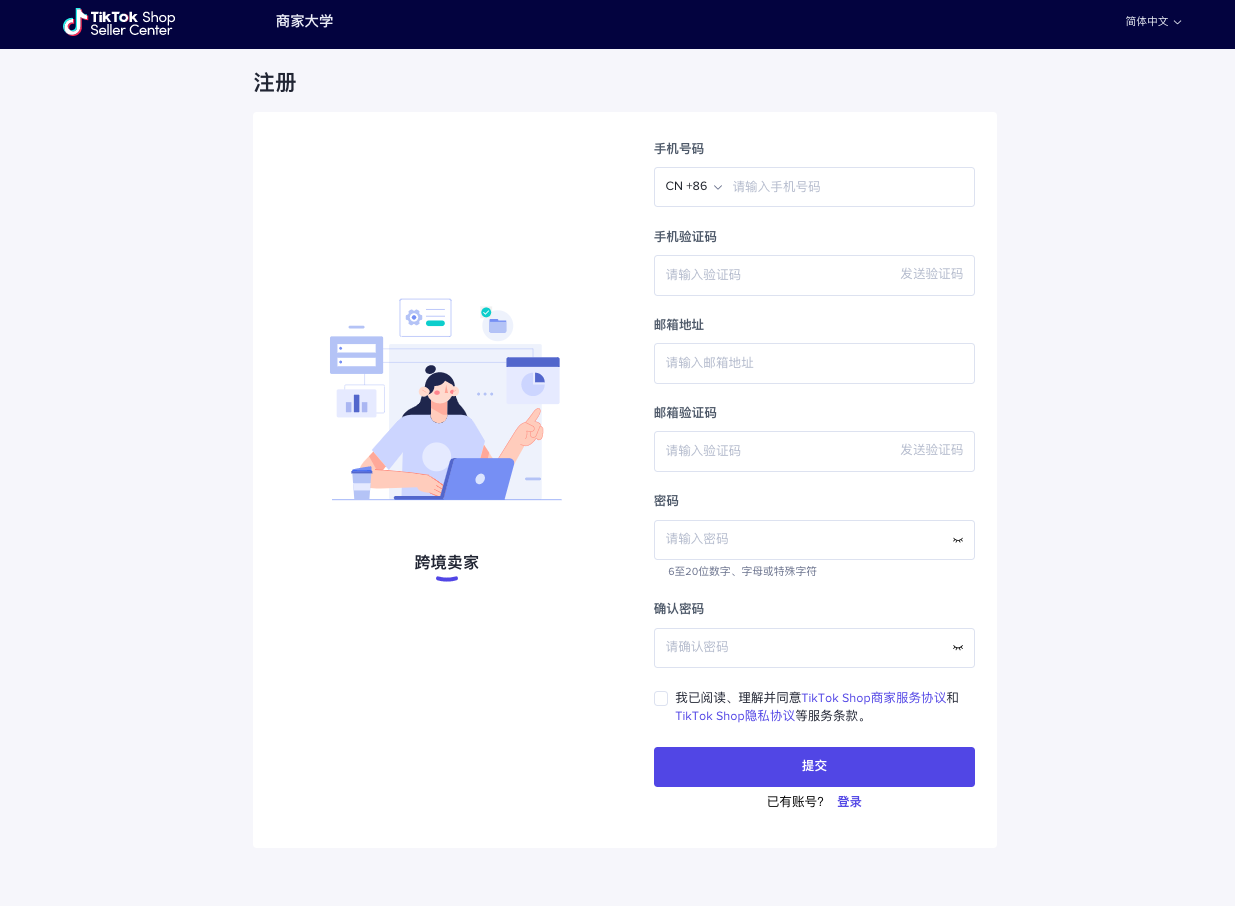
First, go to the store registration link and use a unique domestic/overseas phone number + email to register for Tuke Shop.
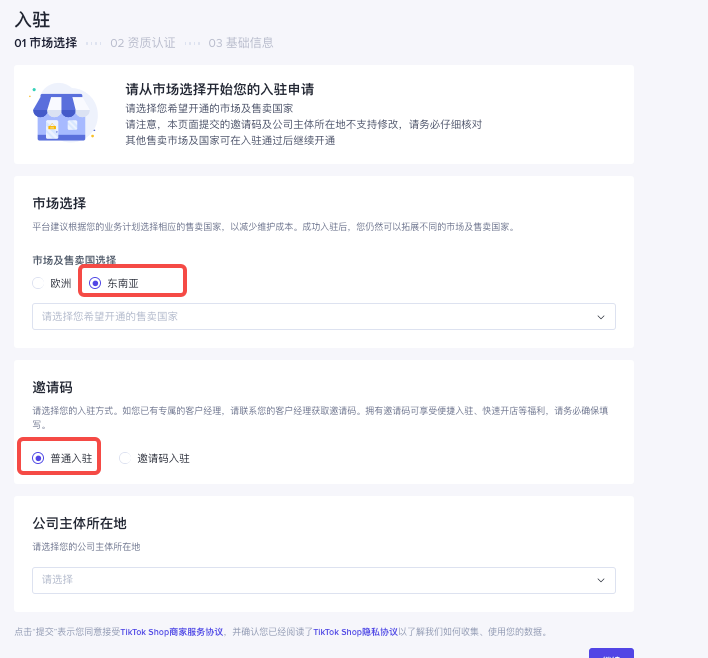
Then, in market selection, choose the Southeast Asian market, and select normal entry below (note: invitation code entry requires an invitation).
Next, select the location of the company entity and choose according to the options.
After filling in the above information, you need to complete qualification certification, including company qualification (business license), legal representative qualification, third-party platform experience, etc.
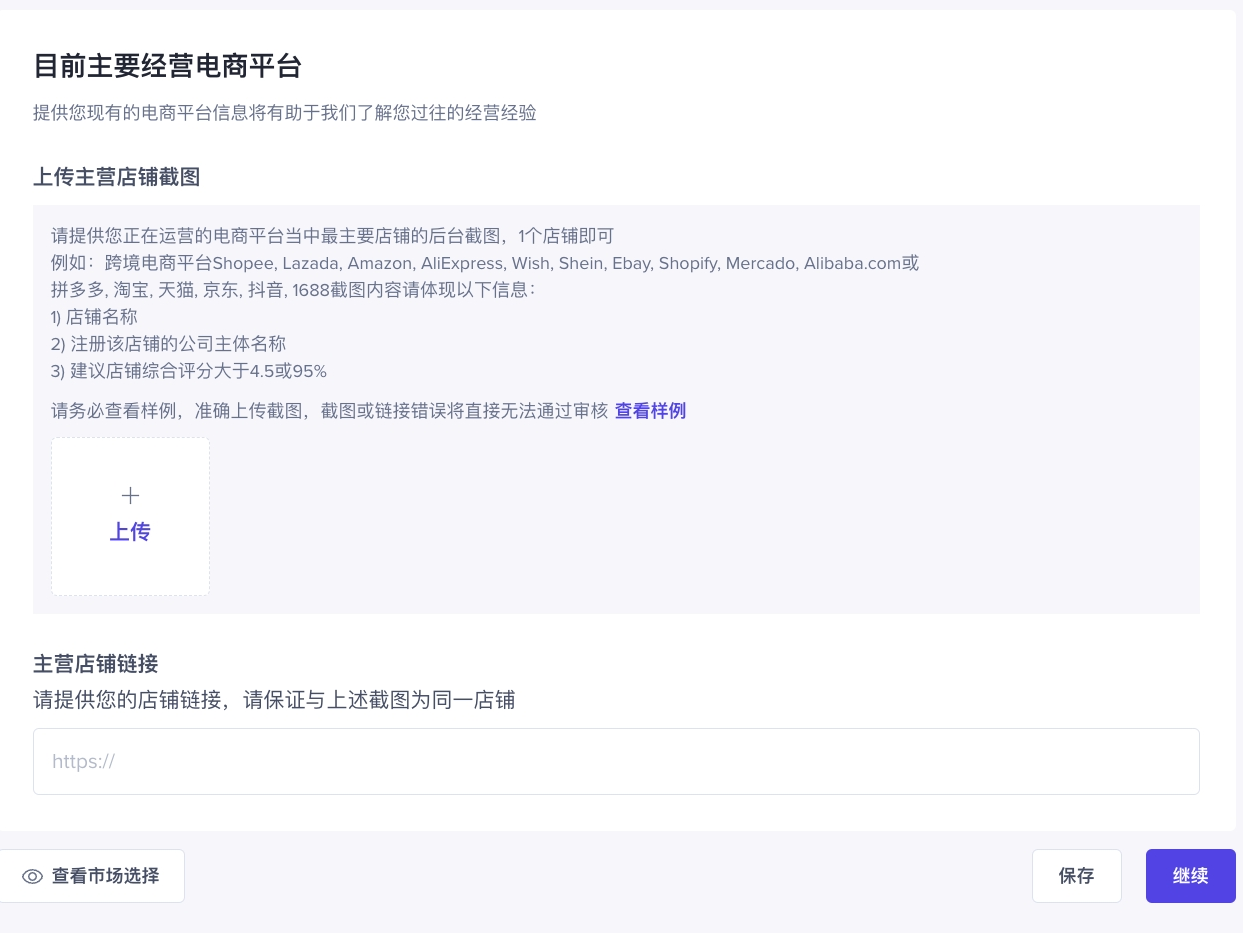
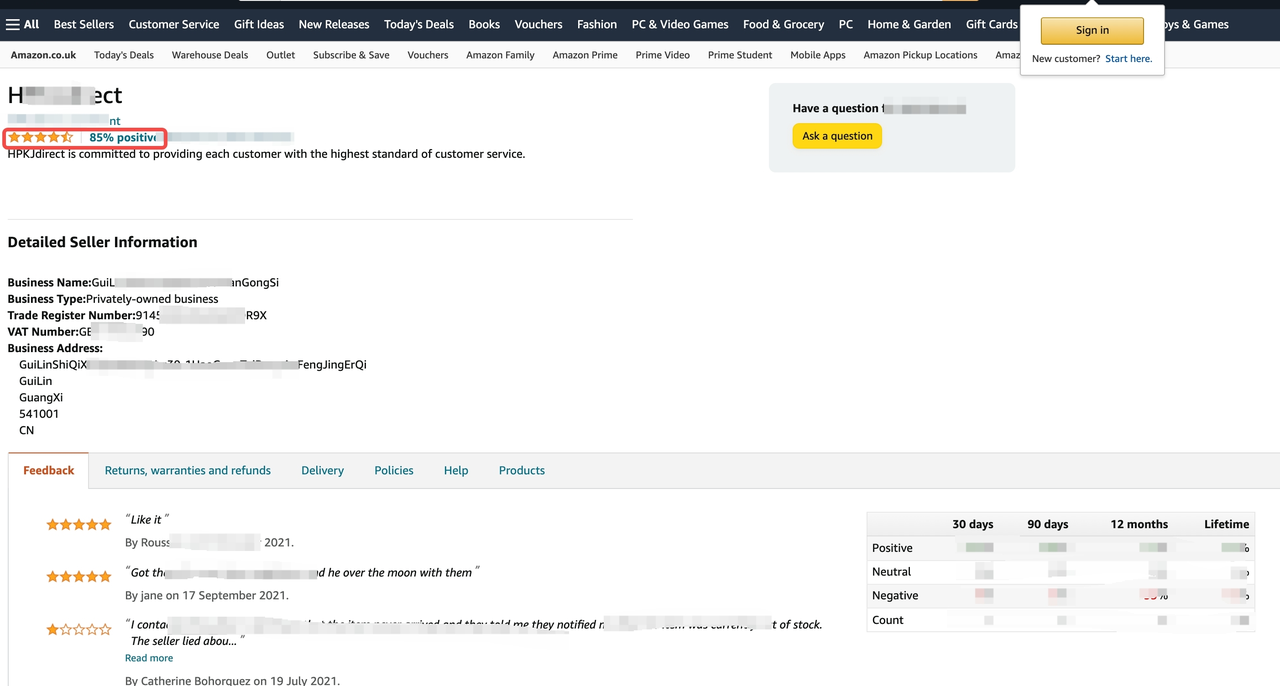
If merchants already have other cross-border platform stores, providing screenshots of other cross-border platforms (as shown) will make it easier to pass the review.
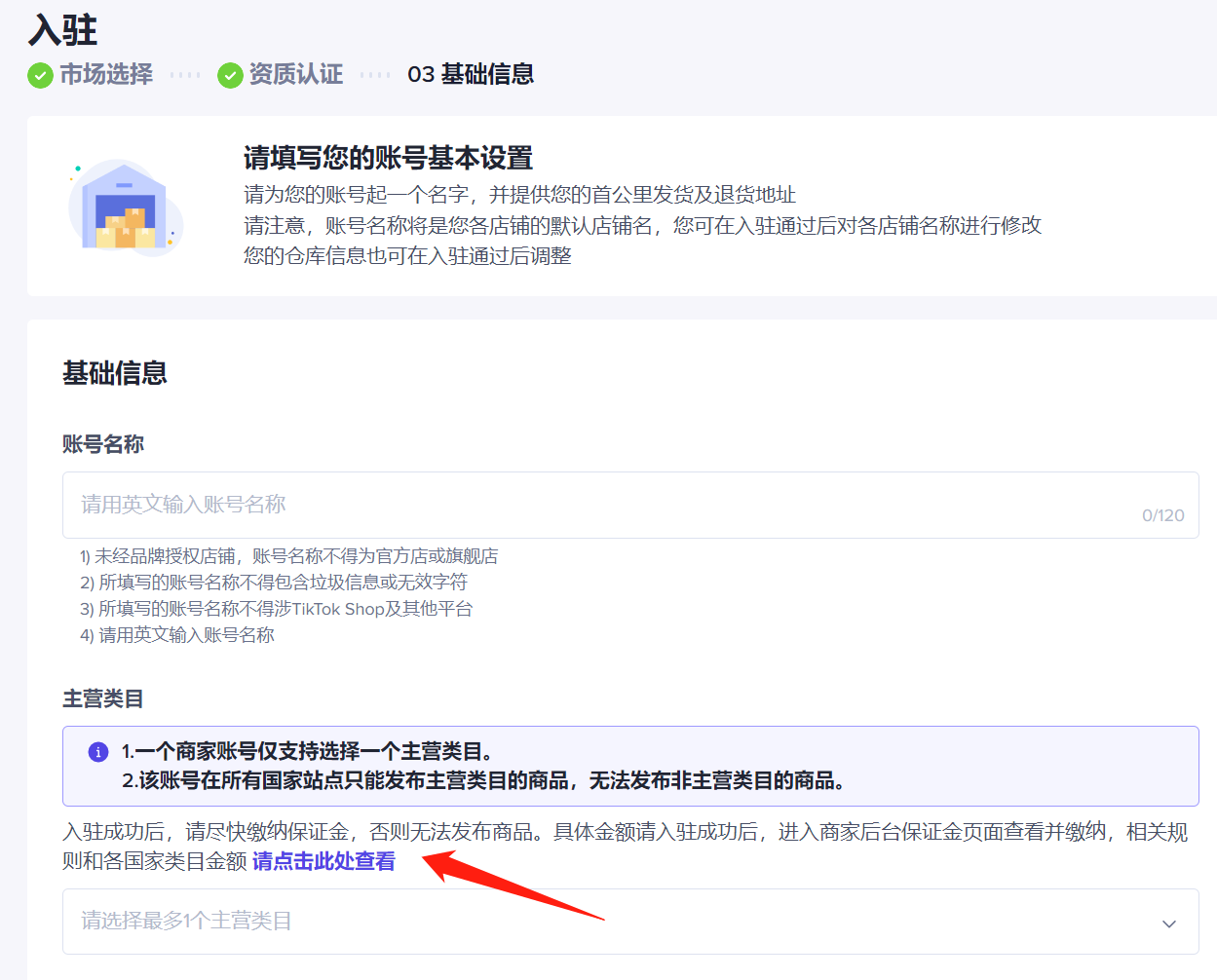
After completing qualification certification, you can fill in the basic information of the store.
This includes setting the store name (must be in English and unique across the internet), selecting the main category (one merchant account only supports one main category, and products can only be published under this category in all country sites), and choosing warehouse information, etc.
Once everything is filled out, you can submit for review. The review time is expected to be 3-10 working days. After successful store registration, you need to register a Tuke account with the same name as the Tuke Shop for binding.
Afterwards, you need to log in to the merchant backend on PC >> Assets >> Deposit, and enter the deposit page. The system will automatically open a deposit account for you. If the system fails to open the account automatically, just click the "Open Deposit Account" button to complete the deposit account opening. If it still fails after clicking, you can contact platform customer service for assistance.
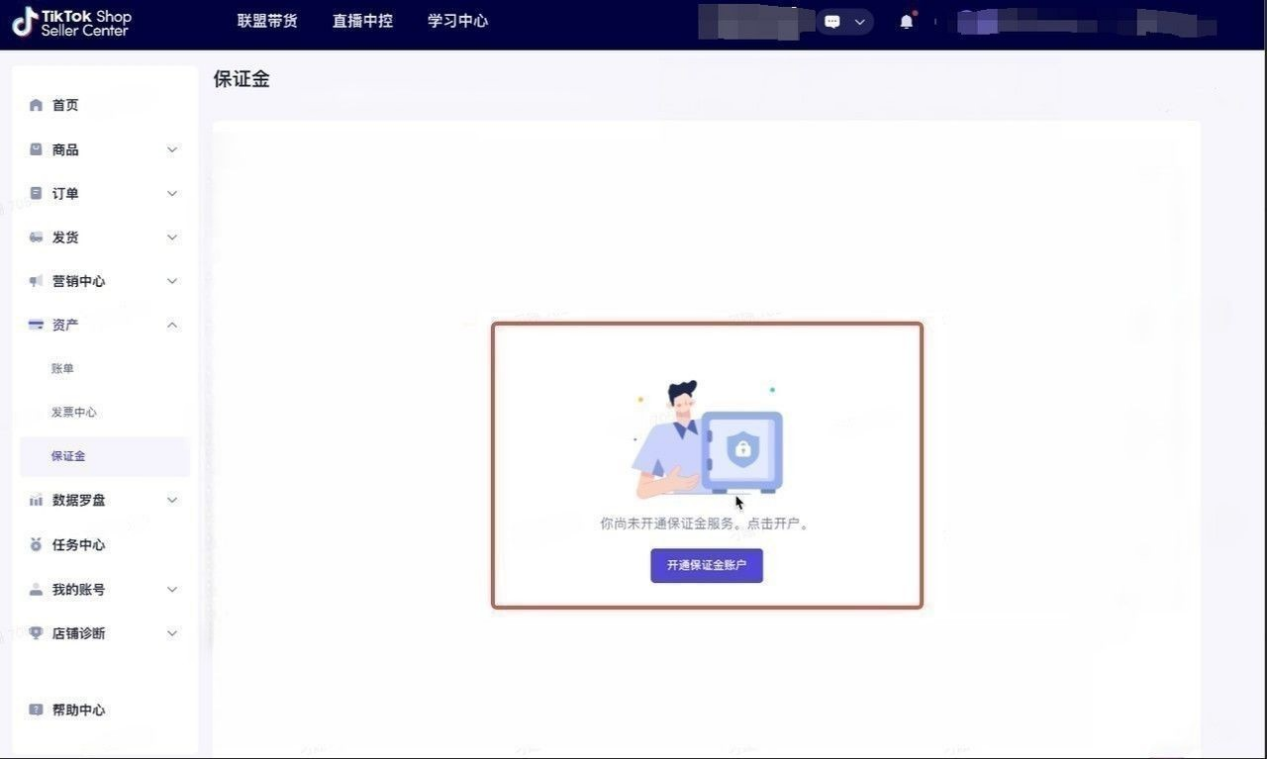
Deposit Payment Process and Rules:
At the top of the deposit page, click "Recharge" to enter the recharge page; enter the recharge amount as prompted, and the system will go directly to the recharge cashier. The exchange rate and handling fee for different payment channels will be clearly stated.
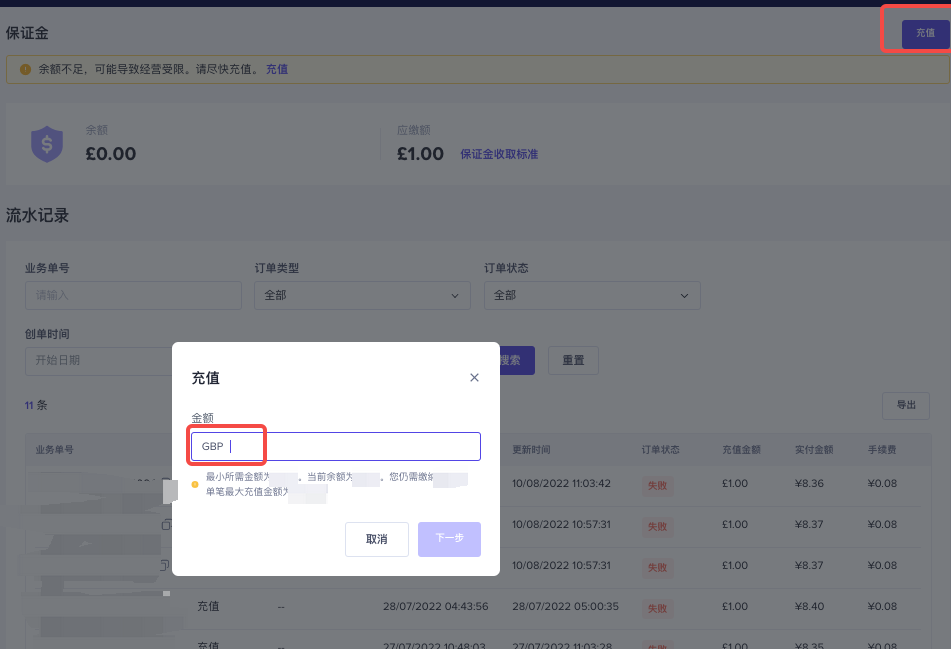
Then enter the settlement cashier, select the payment method. After selecting, click pay, and the page will jump to the payment method selection page. Continue to choose the applicable method until payment is successful.
After registering the store, you can click Seller Backend >> Growth Center >> My Tasks >> Entry Exam to quickly learn key knowledge about platform rules, store settings, pre-sale preparation, car-hanging delivery, shipping fulfillment, and other important aspects to help you operate your Tuke store better.
II. Basic Settings for Tuke Shop Store
When registering for a Tuke store, we have already set some store information, so next we just need to complete it. This includes shipping warehouse (already set during registration), return warehouse address, binding of settlement account, binding of store influencer account (i.e., a Tuke account consistent with the store's country site as the store influencer account), IM customer service settings, product uploads, etc.
Since some steps have already been done during registration, we won't repeat them here. If you have any questions, feel free to contact us in the comments section.
Shipping Warehouse and Return Warehouse Address Settings
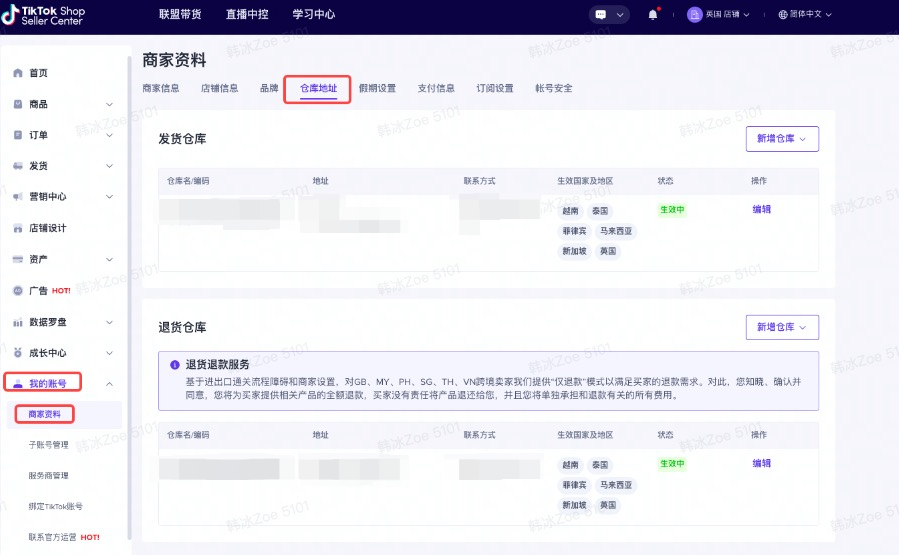
In My Account >> Seller Profile >> Warehouse Address, we can set the shipping and return warehouse addresses. You are required to fill in the real and detailed address and warehouse phone number, then submit.
Binding Settlement Account
Tuke Shop's third-party payment platform is Payoneer, which is currently the settlement method for all cross-border accounts, so you need to complete registration yourself. Without registration, settlement cannot be completed.
Payoneer offers two types of accounts: personal and business. When withdrawing, you can choose to withdraw to a company bank account or the legal representative's personal bank account.
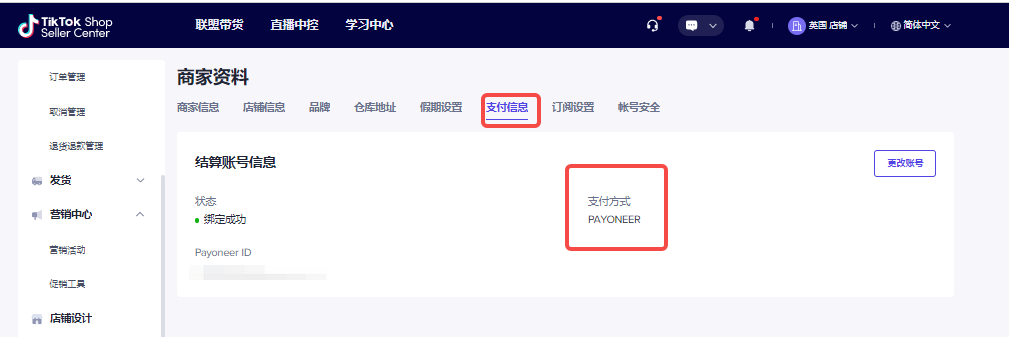
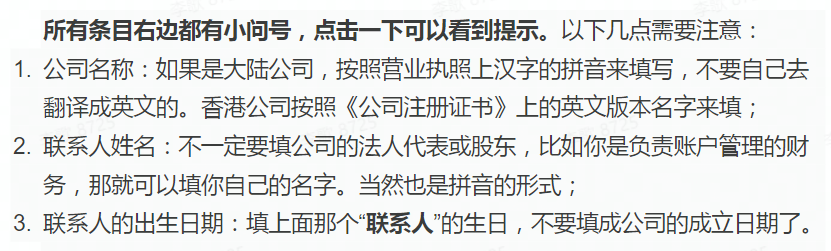
The specific binding process will not be described in detail here, just a note onPayoneer registration tips:
IM Customer Service Settings
IM is a built-in feature of Tuke Shop. Setting up the IM system for pre-sale communication and after-sales service can help merchants promptly address buyer feedback.
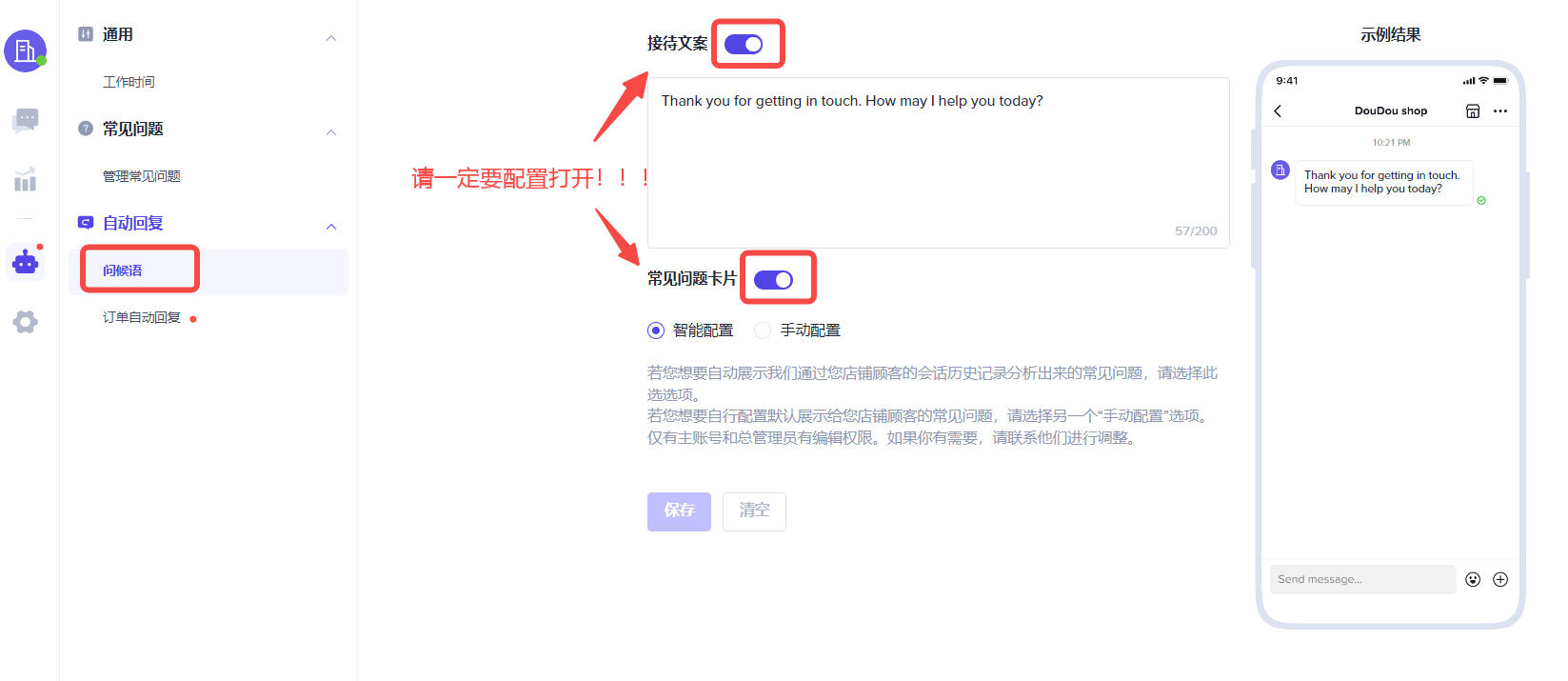
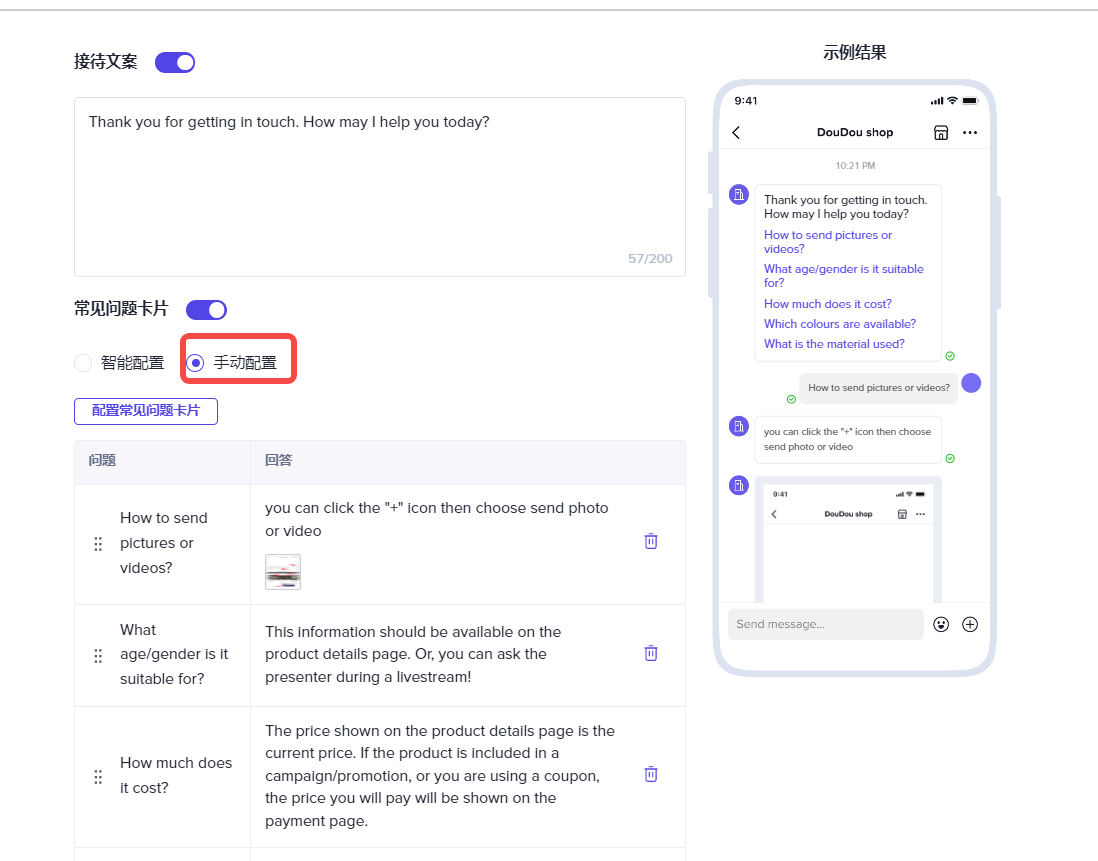
Moreover, since one of the seller performance indicators is the IM customer service 24-hour response rate, to help merchants meet this indicator, it is strongly recommended to enable the greeting message, reception script, and FAQ cards in the IM settings. The setup path is as follows:
Click IM Online Customer Service—Select Greeting—Enable Reception Script, FAQ Cards (it is recommended to edit and select common questions yourself)
Product Publishing
After completing all the preliminary preparations, you can publish your product on the product upload page.
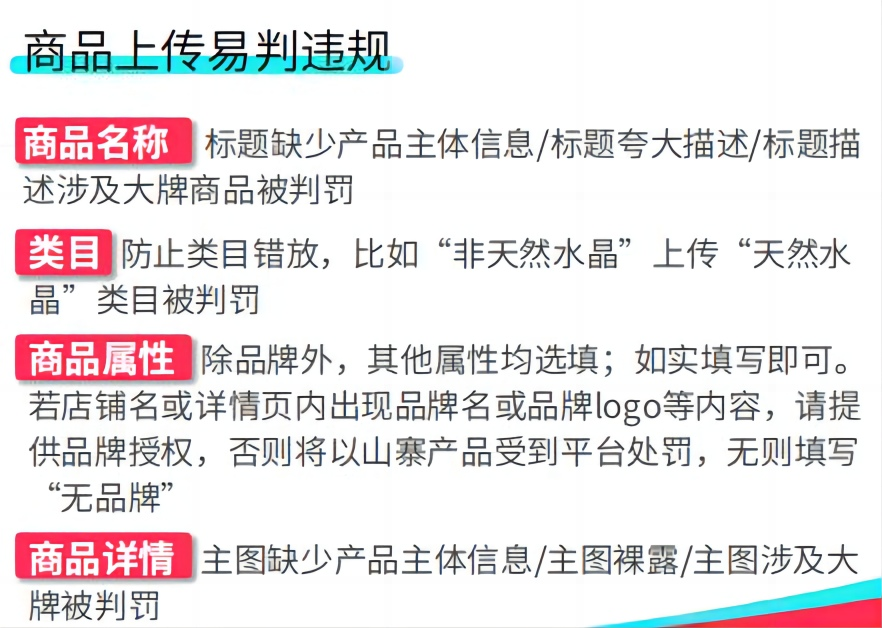
Note that overseas rules are different from domestic ones. Different countries have different bans, and some products are prohibited from being sold. So before listing, be sure to check the product rules for your store's region to avoid violating regulations and getting your store closed.
Additionally, incorrect information when uploading products can also lead to penalties and affect your store, so pay attention to this as well.
Product Pricing
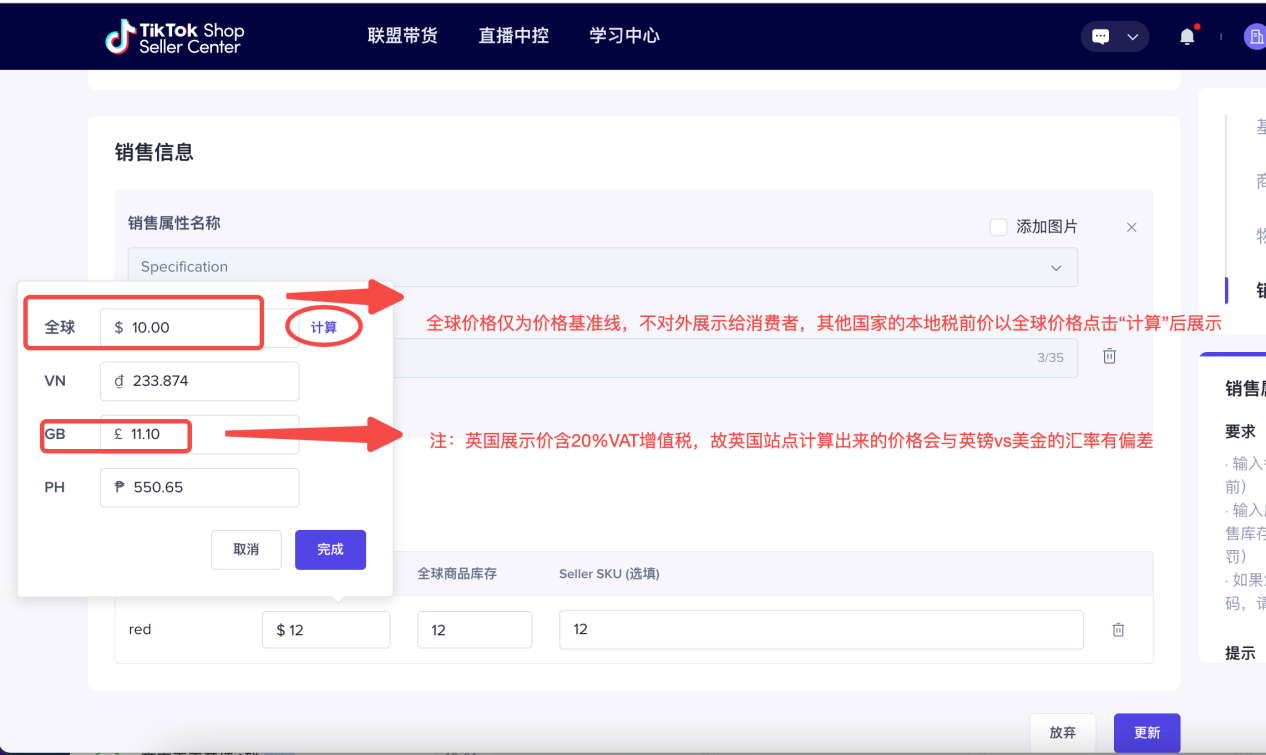
Global product local display price = (pre-tax price + cross-border logistics cost) * (1 + VAT rate)
Pre-tax price = product cost + profit + platform commission + platform withdrawal fee + Payoneer withdrawal fee + influencer commission + return shipping fee
For example:
Final selling price for Southeast Asian products: product cost + profit + platform commission + platform withdrawal fee + withdrawal fee + first-leg shipping (i.e., "cross-border logistics cost" on the product page) + influencer commission (set by yourself); merchants who "do not offer free shipping" only need to pay cross-border logistics cost, no need to pay last-leg shipping.
Cross-border logistics cost refers to the logistics fee for shipping goods from the domestic distribution warehouse to the local warehouse. This cost is the seller's logistics cost for sending goods to the destination country and will be included in the product price.
Once you understand the listing rules for Tuke Shop products, you can start preparing for your chosen track. This includes your first Tuke video, your first live stream, collaborating with Tuke influencers, etc.—all things to consider at this stage.
Additionally, you can join some cross-border communities or cooperate with managed service companies to seek more development opportunities.
Of course, if you have any other questions, you are very welcome to communicate with us. We hope this Tuke Shop cross-border store opening process can help more friends who want to go global.