
 4021
4021Tuke has evolved from a video app into an important marketing platform for enterprise brand promotion. You can use Tuke to create ads that help potential customers discover your brand. Among these, the most crucial aspect is conducting Tuke ad analysis to accurately track the performance of your marketing campaigns. Below, Tuke will explore with you how to understand and analyze Tuke ads to help you achieve better Tuke advertising results.

How to analyze Tuke ads?
Analysis can be done directly on Tuke Ads Manager, or externally using custom analytics dashboards and reports. The Ads Manager allows you to use out-of-the-box features for Tuke ad campaign analysis and optimization.

Native analytics data on Tuke Ads Manager
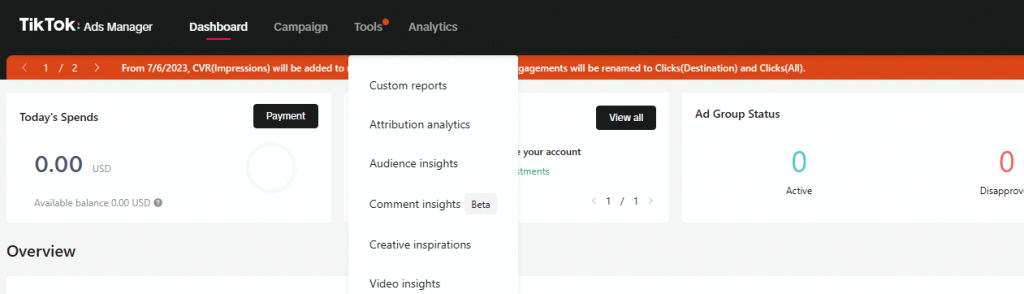
Tuke Ads Manager has four navigation links in the menu bar: Dashboard, Campaigns, Tools, and Analytics. In reality, only three are related to Tuke ad analysis.
1. Dashboard
The dashboard is the first page you access on the platform, providing an overview of all your ad campaigns. At the top of the page, you can see information such as today's spend, top recommendations, and ad group status. Next, you'll find charts for overview, campaigns, gender, placement, operating system, and time segmentation.

2. Campaigns
Here, you can see a table containing your ad campaigns, listing the name, status, budget, total cost, target cost per click (CPC), cost per thousand impressions (CPM), impressions, target clicks, cost per action (CPA), conversions, and click-through rate (CTR).

3. Analytics features
The Analytics option displays a dropdown submenu with several links—Custom Reports, Attribution Analysis, Audience Insights, Comment Insights, Creative Inspiration, and Video Insights. So how do you use these to analyze ads?
1. Custom Reports
You can create custom reports using your own set of metrics or templates. You can choose to view dimensions and metrics in a table format or switch to a trend line view.
2. Attribution Analysis
You can compare and measure ad campaign performance across different attribution windows, providing insights to guide future strategies.
3. Audience Insights
Provides extremely detailed insights about potential and reached audiences. You can filter and view the reached audience for each campaign, ad group, and ad.
4. Comment Insights
You can identify and analyze sentiment in comments. There are charts showing comment trends, sentiment ratios, comment audience, word clouds, and all comments.
5. Creative Inspiration
By curating top ads on Tuke, you can gain inspiration for ad creativity and discover trends unique to each location and industry.
6. Video Insights
Here you can check video views and monitor charts for trend analysis and comparative analysis.
Key metrics to monitor in Tuke ads
After discussing how to analyze Tuke ads, let's share which KPIs we should focus on when conducting Tuke ad analysis:
1. Impressions: The total number of times your ad is shown to Tuke users.
You need to know how many active users saw your ad to measure the exposure of your Tuke marketing campaign. This helps determine your budget efficiency and where your target audience encountered your ad placements.
2. Clicks (Conversions): The number of clicks on your ad.
When users are interested in your ad, they will naturally interact with it. They can click to perform certain actions, such as registering, sending messages, etc. This helps calculate the ratio of clicks to completed actions.
3. Click-through rate (CTR): The percentage ratio of clicks to impressions.
CTR indicates how attracted your audience is to click on your ad. If it's low, you need to change your ad creative, call-to-action (CTA), or targeting to get better results.
4. Conversion rate (CVR): The proportion of users who complete an action after clicking the ad.
This is an important performance metric that helps determine the success of your campaign, calculate the effectiveness of your ad in achieving its goals, improve overall campaign strategy, and determine whether you achieved an acceptable ROI at the end of the day.
5. Cost per click (CPC): The average cost per click.
This metric helps optimize bidding strategies and effectively plan your ad budget. A lower CPC means you pay less per click, making your ads more cost-effective. Note that CPC varies by industry.
6. Cost per thousand impressions (CPM): The average cost per thousand impressions.
Budget planning is very important when running Tuke ads. You need to know the cost of showing your ad to user accounts. A lower CPM means you spend less to achieve a thousand impressions.
7. Cost per action (CPA): The average cost per conversion.
When trying to measure performance, you should analyze the cost of each action. A lower CPA means you can expect a greater return on ad spend.
8. Total cost: The total amount spent on your campaign, ad group, or ad.
You need to track your ad spend in real time and review the total spend over a period of time. This helps compare ad spend with other performance metrics to determine whether you spent the right amount on your campaign.
9. Frequency: The number of times each unique user sees your ad.
Sometimes, showing your ad multiple times to the same user is beneficial, but you shouldn't overdo it. If your target audience is limited, they may get tired of seeing your ad. It's best to have a broad audience and test each customer segment with your ads.
10. Reach: The number of unique user accounts that saw your ad at least once.
If you want to increase brand awareness, you should focus on reach rate, which helps determine which customer segments have already seen your ad.

Now that we've covered how to conduct Tuke ad analysis and the 10 important metrics to consider, if you're still unsure, you can consult a professional overseas team or directly ask them to help with ad placement or Tuke account management. With the operation of a professional overseas team, you can expect better Tuke marketing results.
To learn more about B2B overseas marketing strategies, follow the WeChat official account: TuKe Overseas