يقدم هذا التقرير أفضل الممارسات للتجارة الإلكترونية على TikTok للمبتدئين من الشركات الصغيرة والمتوسطة، ويتضمن أساسيات إعلانات TikTok، وقائمة خطوات إطلاق أول حملة إعلانية، بالإضافة إلى دراسات حالة ونصائح ذات صلة.
1. أساسيات إعلانات TikTok
- التحديات والحلول: بالنسبة لتجار التجزئة عبر الإنترنت، يمثل العثور على عملاء جدد تحديًا، بينما يوجد عملاء محتملون على TikTok. 92% من المستخدمين حول العالم يتخذون إجراءً بعد مشاهدة مقاطع فيديو TikTok.
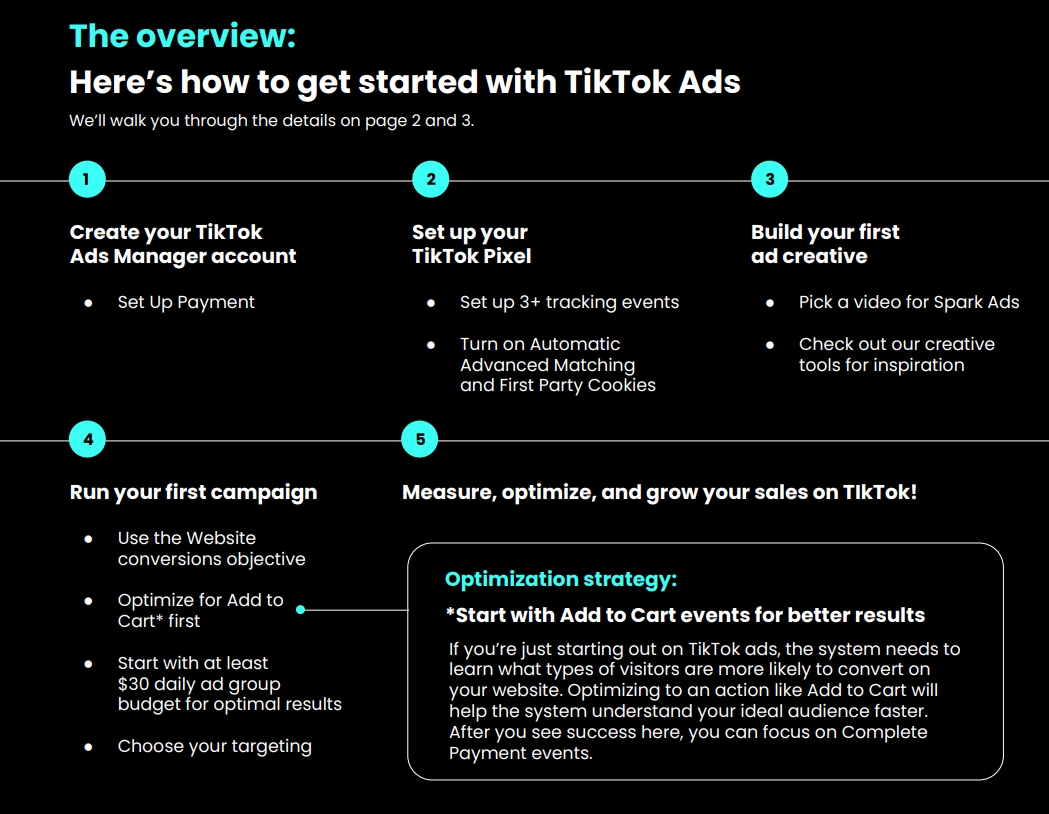
- نظرة عامة: يشرح خطوات إطلاق إعلانات TikTok، بما في ذلك إنشاء حساب TikTok Ads Manager، وإعداد الدفع، وإعداد TikTok Pixel، وإعداد 3 أحداث تتبع على الأقل، وتفعيل المطابقة المتقدمة التلقائية وملفات تعريف الارتباط الطرف الأول، وإنشاء أول إعلان إبداعي، واختيار فيديو لـ Spark Ads، وإطلاق أول حملة إعلانية، وقياس المبيعات وتحسينها وتنميتها.
- استراتيجية التحسين: للمبتدئين في الإعلان على TikTok، يُنصح بالتحسين بناءً على حدث "إضافة إلى سلة التسوق" أولاً، لتمكين النظام من فهم الجمهور المثالي بشكل أسرع، ثم يمكن التركيز لاحقًا على حدث "إتمام الدفع".
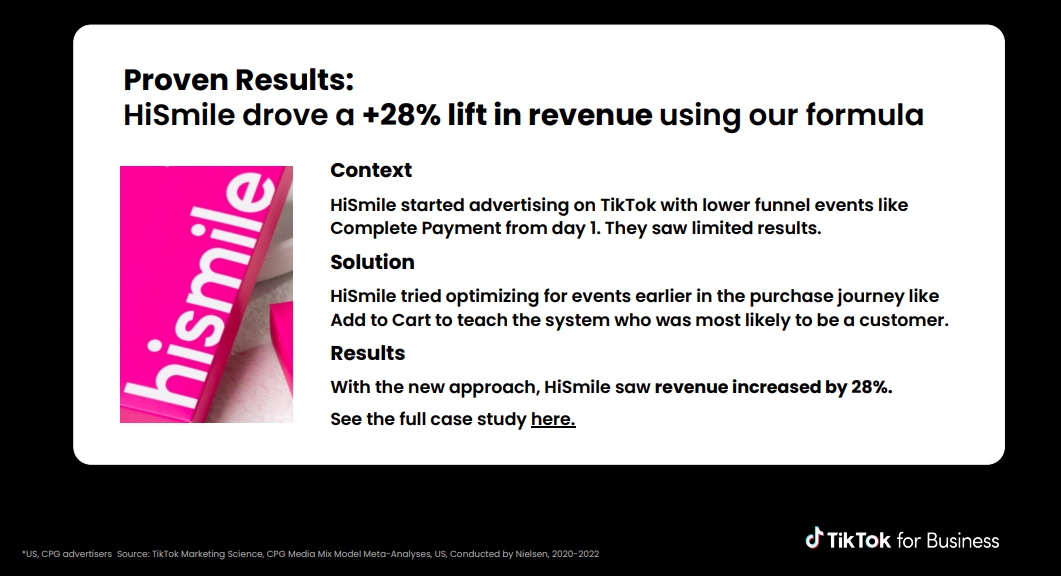
- دراسة حالة: بدأت HiSmile بالإعلان باستخدام أحداث المرحلة السفلى مثل "إتمام الدفع" وكانت النتائج ضعيفة، وبعد التحول إلى تحسين أحداث المرحلة المبكرة من رحلة الشراء مثل "إضافة إلى سلة التسوق"، زادت الإيرادات بنسبة 28%.
2. قائمة خطوات إطلاق أول حملة إعلانية
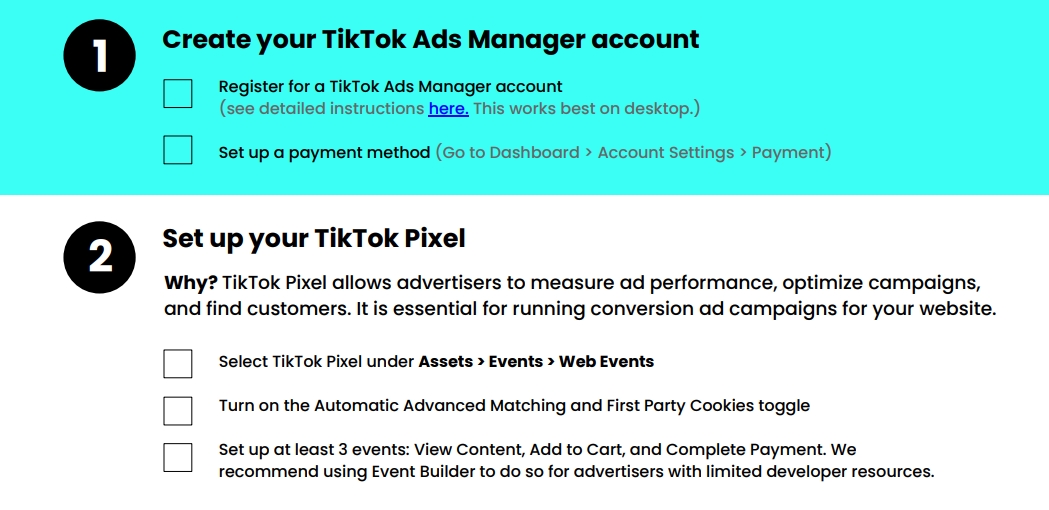
- إنشاء حساب وإعداد الدفع: إنشاء حساب TikTok Ads Manager، وإعداد طريقة الدفع.
- إعداد TikTok Pixel: يشرح أهمية إعداد TikTok Pixel وكيفية القيام بذلك، بما في ذلك اختيار TikTok Pixel، وتفعيل المفاتيح ذات الصلة، وإعداد 3 أحداث على الأقل (عرض المحتوى، إضافة إلى سلة التسوق، إتمام الدفع)، كما يقدم بعض النصائح للإعداد، مثل استخدام منصات الشركاء للإعداد بنقرة واحدة، أو استخدام Google Tag Manager لإضافة أكواد أحداث مخصصة، والتحقق من صحة الإعداد.
- إنشاء الإعلان الإبداعي: لا تخف من تنسيق الفيديو، يمكن استخدام مقاطع فيديو TikTok الحالية كـ Spark Ads، حيث أن معدل إتمام Spark Ads أعلى بنسبة 134% من إعلانات الخلاصة القياسية، ويقدم بعض النصائح لإنشاء Spark Ads ممتازة.
- إطلاق الحملة الإعلانية: إنشاء حملة إعلانية في TikTok Ads Manager، واختيار هدف "تحويلات الموقع"، وإيقاف "تعيين ميزانية الحملة"، واختيار "الموقع" وPixel، وتعيين "إضافة إلى سلة التسوق" كحدث التحسين، واختيار "TikTok" كموضع العرض، وتعيين ميزانية يومية لمجموعة الإعلانات، واختيار الهوية لتشغيل Spark Ads، واختيار منشور عضوي أو تحميل فيديو جديد كإعلان، وملء نص الإعلان وعنوان URL، واختيار "دعوة إلى اتخاذ إجراء" ديناميكية، ثم إرسال للمراجعة.
3. الإجراءات اللاحقة
- مراجعة الإعلان: تخضع جميع الإعلانات للمراجعة، وسيتم إشعارك عند الموافقة، ويمكن مراقبة تحويلات "إضافة إلى سلة التسوق".
- تطوير الحملة الإعلانية: إذا تم تحقيق نتائج معينة، يمكن التفكير في نقل حدث التحسين من "إضافة إلى سلة التسوق" إلى "إتمام الدفع"، مع الاستمرار في تشغيل مجموعة إعلانات "إضافة إلى سلة التسوق" للحفاظ على حجم التحويلات، مما يسمح للنظام بالتعلم المستمر.
- بناء وجود عضوي: إنشاء حساب تجاري على TikTok، وإنتاج محتوى عالي الجودة من خلال دراسة الاتجاهات واستخدام الأصوات الشائعة، والنشر 3-5 مرات أسبوعيًا، واختبار المحتوى الأنسب للجمهور، ثم استخدام Spark Ads لتعزيز الأداء.