2423
2423Mettre en ligne des produits sur TikTok est un processus en plusieurs étapes visant à aider les commerçants à promouvoir et vendre leurs produits via la plateforme de médias sociaux. Alors, comment mettre en ligne des produits sur TikTok ? Les 7 étapes suivantes vous permettront de publier facilement vos produits et d'attirer l'attention du monde entier.
1. Préparation :
Avant de commencer, les commerçants doivent s'assurer de posséder un compte TikTok et d'avoir enregistré et activé la fonction TikTok Shop. Si ce n'est pas encore fait, il faut se rendre sur le site officiel de TikTok Shop (shop.tiktok.com) et suivre les instructions pour terminer l'inscription et l'ouverture de la boutique.
2. Collecte et publication des produits :
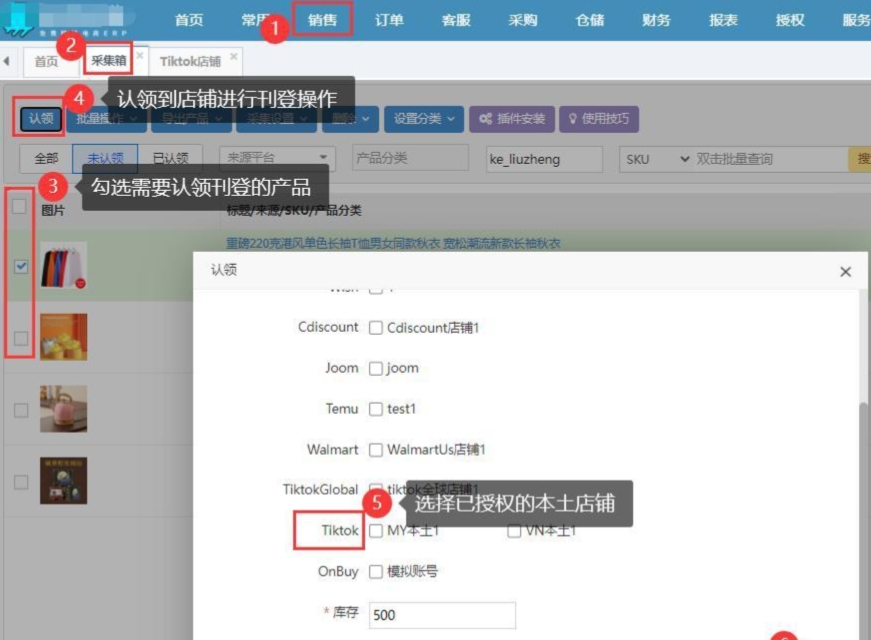
La première étape pour mettre en ligne des produits est la collecte. Les commerçants peuvent installer un plugin de collecte pour rassembler les produits depuis leur page de détails. Une fois réussie, les produits apparaissent dans le panier de collecte. Ensuite, les commerçants doivent publier les produits dans le backend de TikTok Shop. Cela inclut l'autorisation de la boutique, la collecte, la revendication, la sélection des catégories, la définition des codes SKU, etc.
3. Remplissage des informations produit :
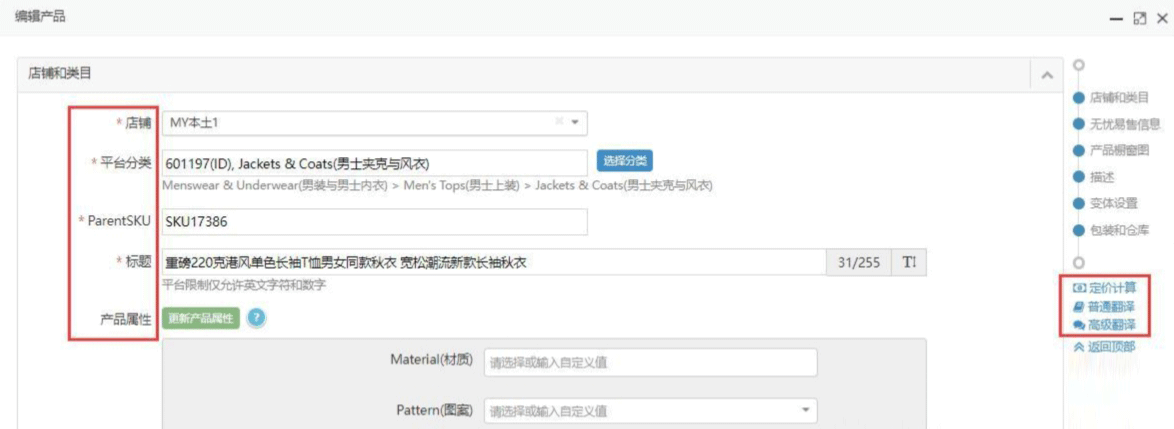
Lors de la publication, il est nécessaire de remplir diverses informations sur le produit. Cela inclut, sans s'y limiter, le titre du produit (pas plus de 255 caractères), les attributs du produit (les attributs obligatoires doivent être remplis), l'utilisation du calculateur de prix, ainsi que la traduction du titre et de la description. Les commerçants peuvent également définir une catégorie locale, enregistrer l'URL source, ajouter des notes, etc., pour mieux gérer les produits.
4. Image de vitrine et description :
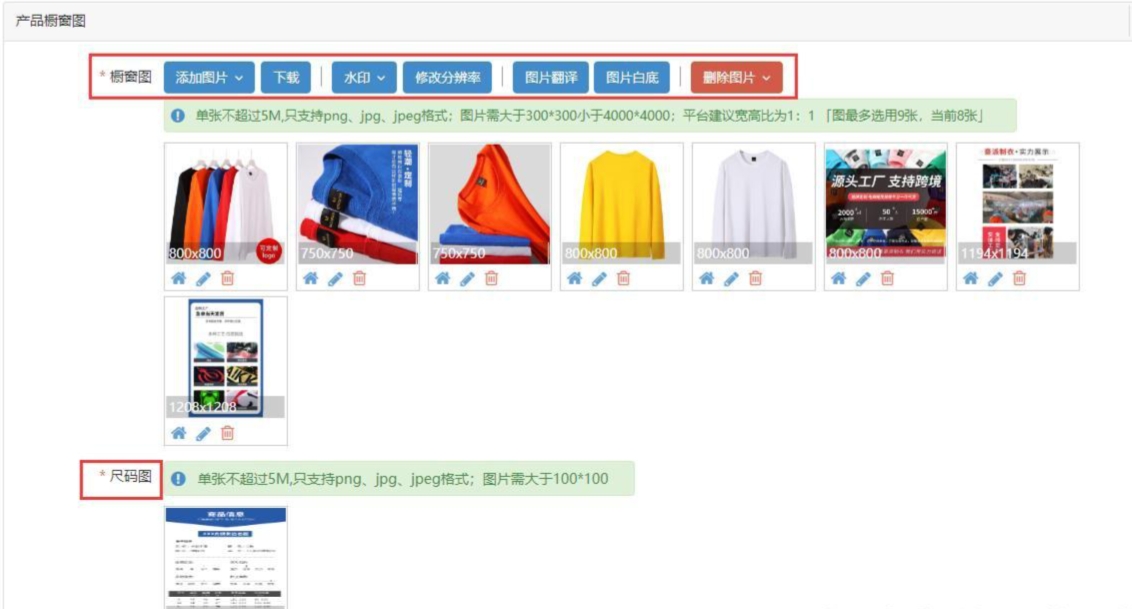
L'image de vitrine du produit est un élément clé pour attirer les consommateurs. TikTok recommande de télécharger jusqu'à 9 images, avec un rapport largeur/hauteur de 1:1. Les commerçants peuvent utiliser les fonctionnalités de la plateforme pour ajouter des images, les télécharger, ajouter un filigrane, modifier la résolution, traduire le texte sur les images, changer le fond blanc, etc. La description du produit est également cruciale ; elle doit être détaillée et peut être traduite dans la langue du marché cible à l'aide de la fonction de traduction.
5. Paramètres des variantes et informations logistiques :
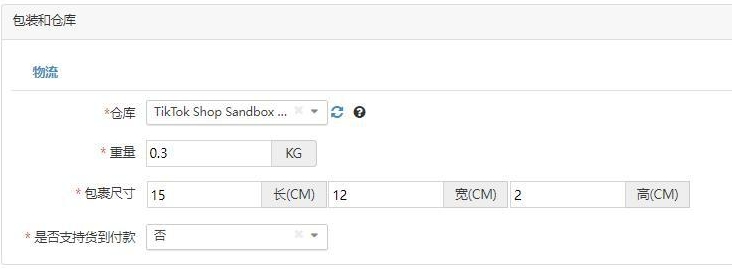
Pour les produits avec des variantes, les commerçants doivent définir les attributs des variantes, l'image principale de l'attribut, le code SKU, les codes EAN/UPC/ISBN/GTIN, etc. En même temps, il faut remplir les informations liées à l'emballage et à la logistique, comme le choix de l'entrepôt, le poids du produit, les dimensions du colis, etc.
6. Vérification et publication :
Une fois les informations produit remplies, les commerçants peuvent utiliser la fonction "Vérifier les mots-clés de contrefaçon" pour s'assurer que les informations ne violent pas les règles de la plateforme. De plus, ils peuvent utiliser des modèles pour remplir rapidement les paramètres d'attributs de produits similaires. Enfin, après vérification, cliquez sur le bouton "Enregistrer" pour sauvegarder les informations, puis sur le bouton "Publier" pour mettre le produit en ligne.
7. Optimisation ultérieure :
Après la mise en ligne, les commerçants doivent surveiller en continu les performances du produit et l'optimiser en fonction des retours de données. Cela peut inclure l'ajustement du titre, de la description, des images, du prix, etc., pour améliorer l'attrait et le taux de conversion du produit.
Points d'attention :
(1) Assurez-vous de l'exactitude et de l'exhaustivité des informations produit pour éviter les litiges commerciaux dus à des erreurs d'information.
(2) Faites attention aux droits d'auteur et à la conformité du produit pour éviter de violer la propriété intellectuelle d'autrui.
(3) Tenez compte des différences culturelles du marché cible et optimisez les informations localisées du produit pour mieux répondre aux besoins des différents marchés.
Grâce à ces 7 étapes et aux 3 points d'attention, les commerçants peuvent réussir à mettre en ligne des produits sur TikTok et tirer parti de l'avantage de trafic de la plateforme pour vendre. Parallèlement, les règles et fonctionnalités de la plateforme TikTok peuvent être mises à jour et modifiées au fil du temps ; les commerçants doivent donc suivre régulièrement les dernières actualités et directives officielles pour garantir le bon déroulement de leurs activités e-commerce.