 3351
3351في العصر الرقمي الحالي، أصبحت التجارة الإلكترونية عبر الحدود وسيلة مهمة للتجار لتوسيع الأسواق الخارجية. وتوفر منصة TikTok، كمنصة تواصل اجتماعي عالمية، قاعدة ضخمة من العملاء المحتملين، مما يدفع المزيد من التجار إلى اختيار فتح متاجرهم الخاصة على TikTok. سيقدم هذا المقال دليلاً شاملاً ومفصلاً حول عملية فتح متجر على TikTok والتكاليف، لمساعدتك على إتقان حيل التجارة الإلكترونية على TikTok بسرعة!
1. تسجيل المتجر
1.1. اختيار نوع المتجر:
يمكن للتجار اختيار فتح متجر عبر الحدود أو متجر محلي وفقًا لاحتياجاتهم. في الولايات المتحدة وإندونيسيا، يُدعم حالياً المتاجر المحلية فقط؛ بينما في المملكة المتحدة وتايلاند وفيتنام وماليزيا والفلبين وسنغافورة، يمكن للتجار اختيار فتح متجر محلي أو متجر عبر الحدود.
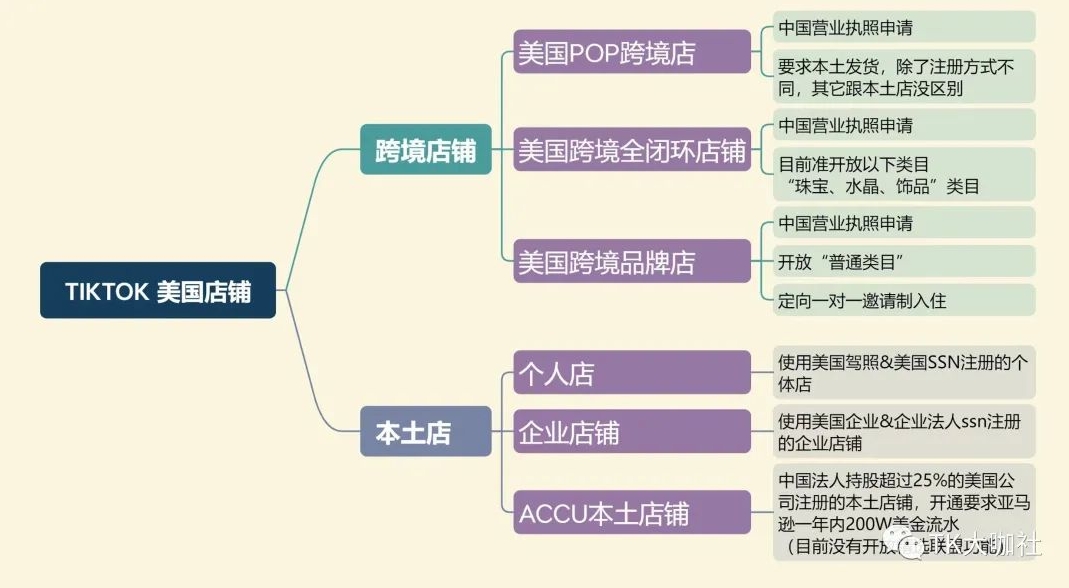
1.2. التحقق من الأهلية:
يحتاج التجار إلى إعداد المواد المؤهلة المناسبة، مثل رقم هاتف أمريكي، بريد إلكتروني أجنبي، رخصة تجارية، رقم الضمان الاجتماعي للكيان القانوني أو رقم التعريف الضريبي الشخصي. بالنسبة لمتجر ACCU الأمريكي، يجب استيفاء متطلبات معينة لحجم المبيعات وشروط الشحن من المستودع الخارجي.
1.3. تسجيل الحساب:
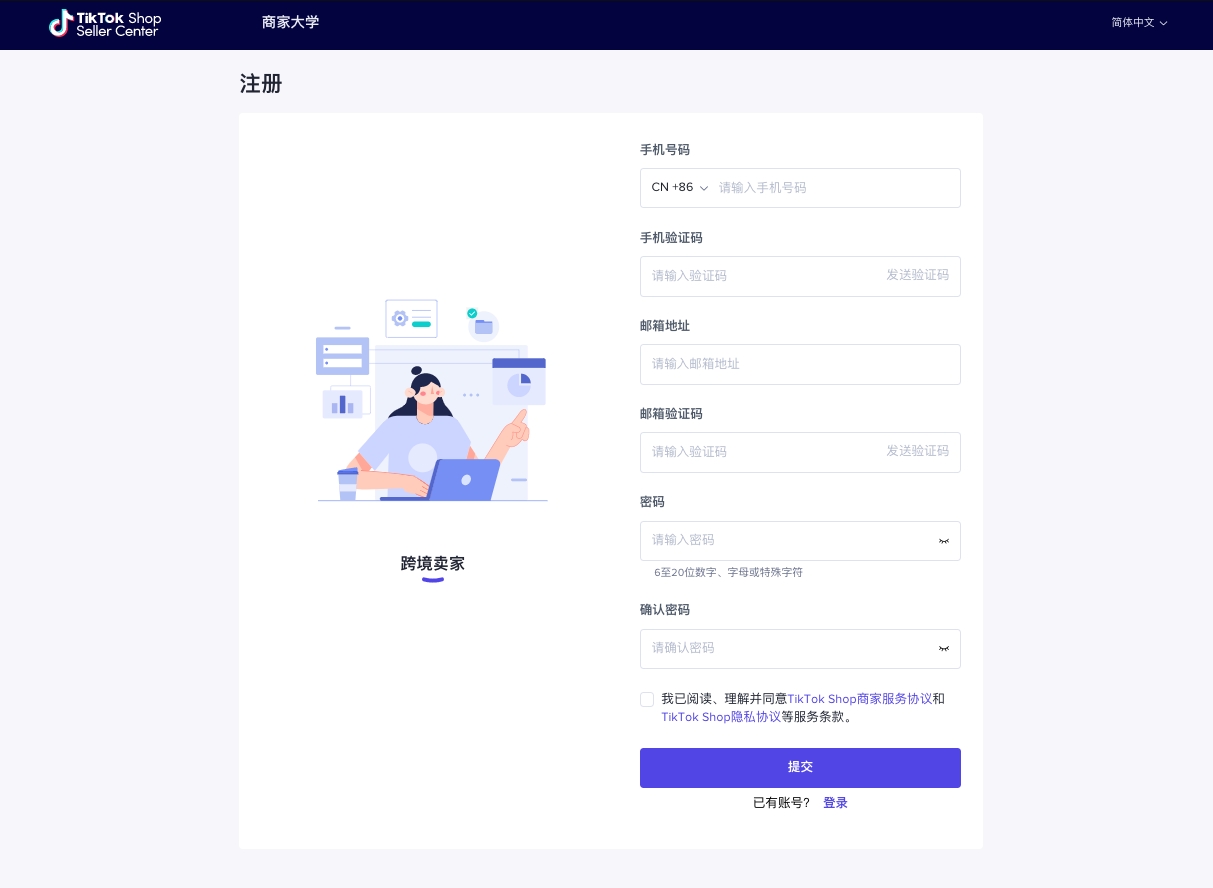
استخدم رقم هاتف محلي أو دولي وبريد إلكتروني للتسجيل في TikTokShop، ويكون الحساب مشتركًا مع حساب TikTokShop أو TikTokForBusiness.
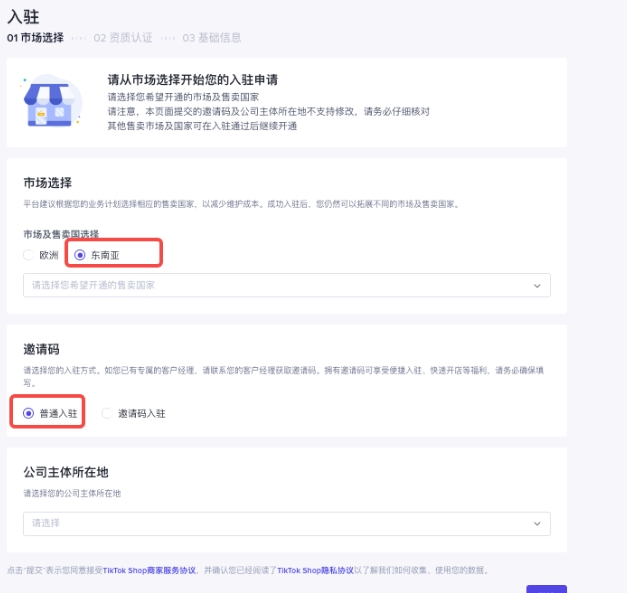
1.4. اختيار السوق وتعبئة معلومات الشركة:
في اختيار السوق، اختر سوق جنوب شرق آسيا، ثم اختر التسجيل العادي (ملاحظة: التسجيل برمز الدعوة يتطلب دعوة).
بعد ذلك، اختر موقع الكيان التجاري الرئيسي، واختر وفقًا للخيارات المتاحة. ثم قم بالتحقق من الأهلية، بما في ذلك أهلية الشركة (رخصة تجارية)، أهلية الكيان القانوني، وخبرة المنصات الثالثة، إلخ.
1.5. تعبئة المعلومات الأساسية للمتجر
يتضمن ذلك اسم المتجر (يجب أن يكون بالإنجليزية وفريدًا على مستوى المنصة)، اختيار الفئة الرئيسية (حساب تاجر واحد يدعم فقط فئة رئيسية واحدة، ولا يمكن لهذا الحساب نشر سوى منتجات الفئة الرئيسية في جميع المواقع الوطنية)، واختيار معلومات المستودع، إلخ.
1.6. تقديم الطلب للمراجعة:
بعد الانتهاء من التحقق من الأهلية، قم بتعبئة المعلومات الأساسية للمتجر وتقديم الطلب للمراجعة، وتستغرق المراجعة من 3 إلى 10 أيام عمل.
2. الإعدادات الأساسية للمتجر
2.1. عنوان مستودع الشحن والإرجاع:
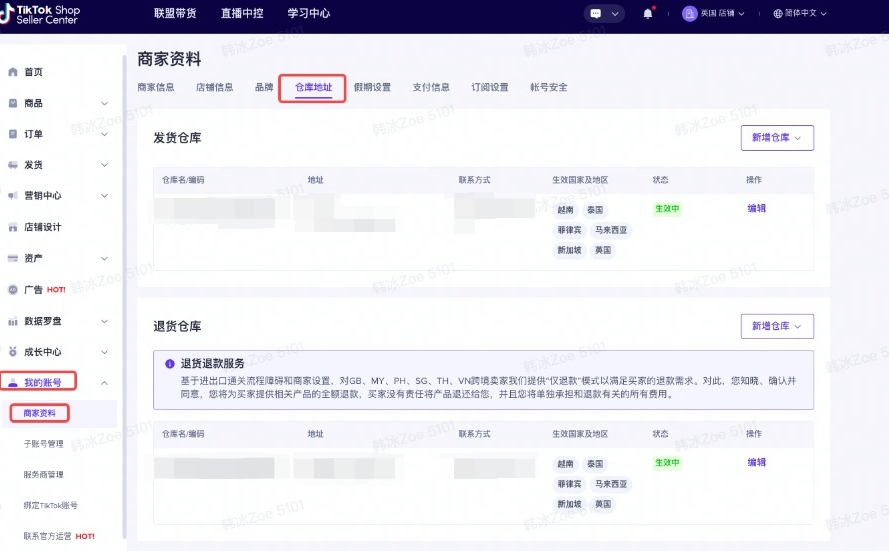
في حسابي >> بيانات البائع >> عنوان المستودع، قم بتعيين عنوان دقيق ومفصل لمستودع الشحن ومستودع الإرجاع.
2.2. ربط حساب التسوية:
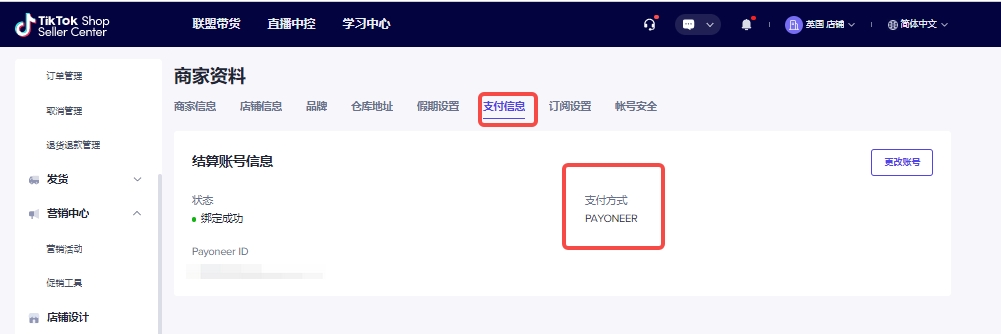
منصة الدفع الثالثة لـ TikTokShop هي Payoneer، ويحتاج التجار إلى التسجيل بأنفسهم وربط حساب التسوية. توفر Payoneer نوعين من الحسابات: حساب شخصي وحساب تجاري، ويمكن عند السحب اختيار السحب إلى حساب بنكي للشركة أو حساب بنكي شخصي للكيان القانوني.
2.3. إعداد خدمة العملاء IM:
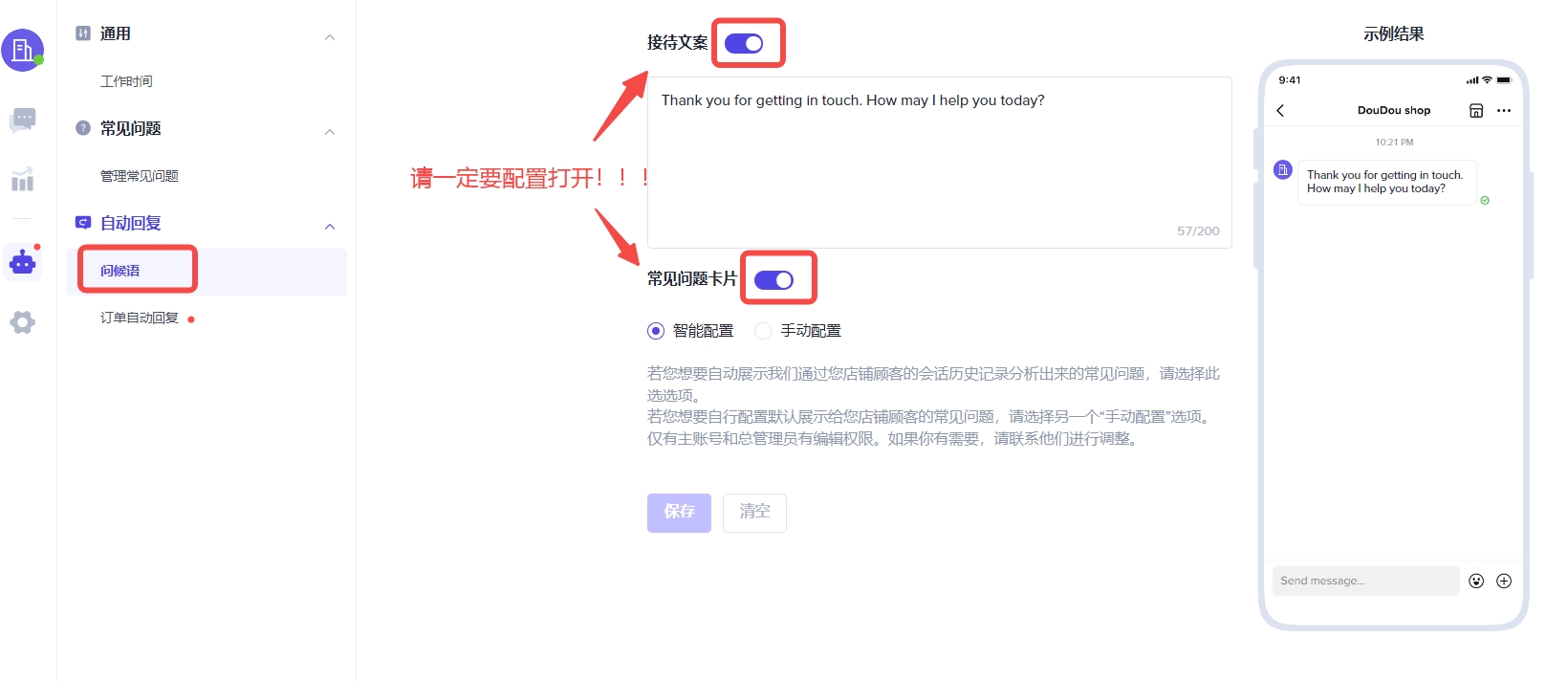
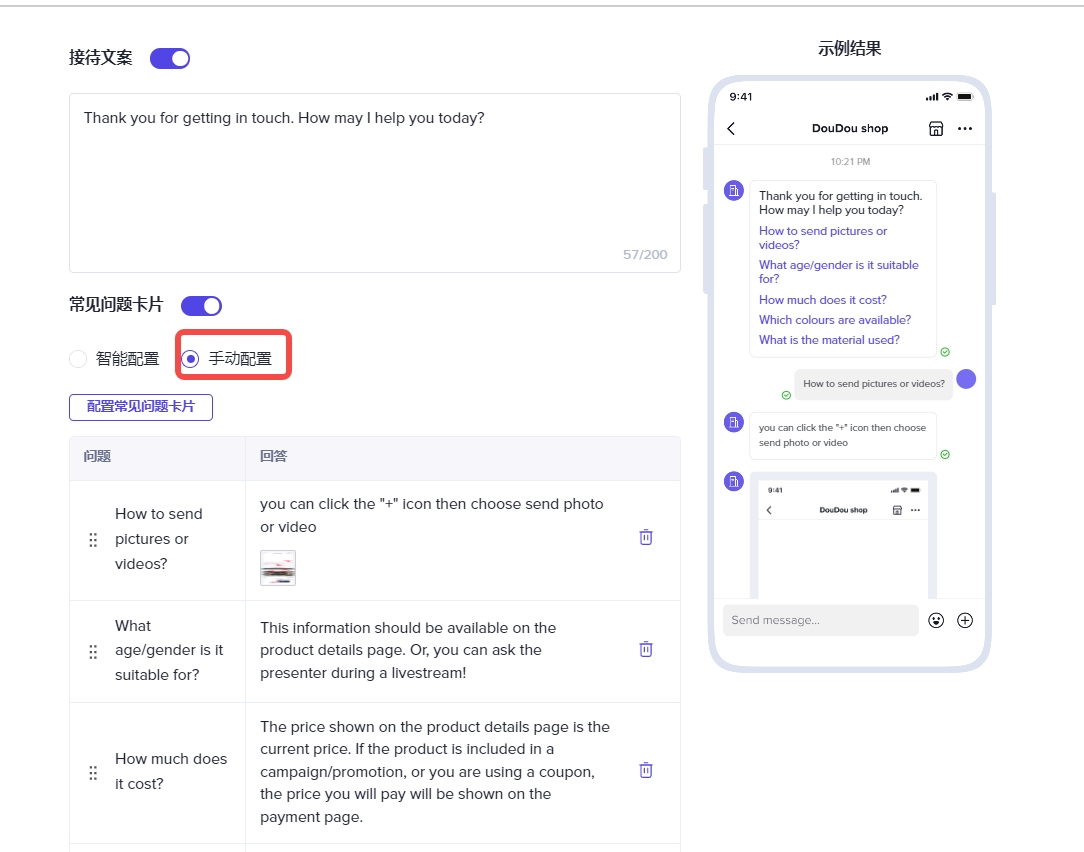
قم بإعداد نظام IM للتواصل قبل البيع وخدمة ما بعد البيع لتلبية متطلبات معدل الاستجابة خلال 24 ساعة. لمساعدة التجار على تحقيق هذه المؤشرات، يُوصى بشدة بتفعيل إعدادات الترحيب في IM الخلفية، بما في ذلك نصوص الاستقبال وبطاقات الأسئلة الشائعة، ومسار الإعداد كالتالي:
انقر على خدمة العملاء عبر الإنترنت IM — اختر الترحيب — قم بتفعيل نصوص الاستقبال وبطاقات الأسئلة الشائعة (يُوصى بتحرير واختيار الأسئلة الشائعة بنفسك).
3. رفع المنتجات وتسعيرها
3.1. فهم قواعد المنتجات:
تختلف حظر المنتجات من دولة لأخرى، ويحتاج التجار إلى فهم والامتثال لقواعد المنتجات في منطقة المتجر.
3.2. استراتيجية تسعير المنتجات:
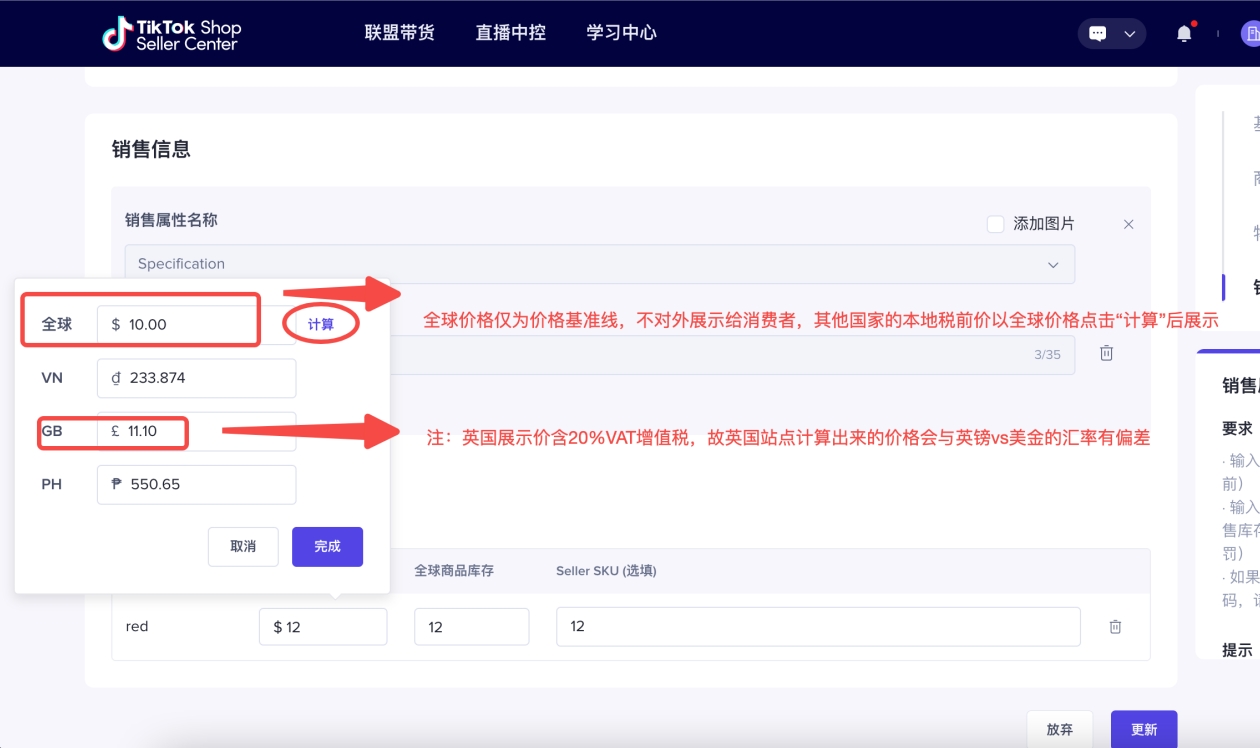
صيغة حساب سعر العرض المحلي للمنتج العالمي هي (السعر قبل الضريبة + تكلفة الشحن عبر الحدود) * (1 + معدل ضريبة القيمة المضافة VAT)، حيث السعر قبل الضريبة = تكلفة المنتج + الربح + عمولة المنصة والرسوم الأخرى.
وفي الوقت نفسه، تشمل تكاليف فتح متجر على TikTok بشكل أساسي الأجزاء الأربعة التالية:
(1) الضمان:
يحتاج التجار إلى دفع ضمان وفقًا لمتطلبات TikTokShop، ويختلف المبلغ حسب نوع المتجر والمنطقة.
(2) عمولة المنصة:
تفرض TikTokShop عمولة بنسبة مئوية على كل معاملة، وتختلف النسبة وفقًا لأحدث سياسات المنصة.
(3) رسوم الدفع:
عند استخدام منصات دفع ثالثة مثل Payoneer، توجد رسوم سحب معينة.
(4) تكلفة الشحن:
تشمل تكلفة الشحن عبر الحدود من المستودع المحلي إلى المستودع المحلي، بالإضافة إلى رسوم الشحن النهائية المحتملة.
تجدر الإشارة إلى أن عملية فتح المتجر والتكاليف قد تتغير مع تحديثات سياسات المنصة، لذلك يجب على التجار متابعة أحدث مستجدات TikTokShop باستمرار لتعديل استراتيجياتهم التجارية في الوقت المناسب. كما يجب على التجار التركيز على التعاون مع مؤثري TikTok، واستخدام مقاطع الفيديو القصيرة والبث المباشر لتعزيز شهرة العلامة التجارية وزيادة المبيعات.