 4797
4797Ces dernières années, de nombreuses personnes ont souhaité utiliser TikTok pour partager leur créativité, gagner des abonnés et même monétiser leur contenu. Cependant, comme TikTok est la version internationale de Douyin, il nécessite de se connecter à un réseau étranger, ce qui bloque beaucoup de gens à l'étape la plus simple mais aussi la plus difficile : comment créer un compte TikTok.
Pour cela, nous avons préparé« Guide complet : la base de connaissances pratiques TikTok la plus complète et la plus puissante du web », destiné à aider les usines, les entreprises de commerce extérieur, l'industrie manufacturière, etc., à passer du statut de débutant à celui d'initié sur TikTok !
D'autres contenus pratiques sur la gestion de compte, la sélection de produits, l'ouverture de boutique, etc., suivront pour vous aider à résoudre les problèmes de demandes de renseignements B2B, B2C, de trafic commercial transfrontalier, etc.
Bon, trêve de bavardages, commençons les conseils pratiques !

I. Téléchargement, installation et configuration de TikTok sur Android/Apple
1. Préparation du téléphone
Recommandation d'utiliser un iPhone :
Il suffit d'1 à 2 iPhones d'occasion (8+64G+non jailbreaké). Le prix en boutique d'occasion est d'environ 800 yuans. Si le budget le permet, il est conseillé d'acheter un iPhone 8P-16G, prix d'occasion entre 800 et 1000 yuans/unité, version américaine ou européenne.
2. Configuration de l'iPhone
(1) Retirer la carte SIM
Retirez la carte SIM du téléphone. Si vous utilisez une carte étrangère, aucune action n'est nécessaire. Cela évite que votre environnement réseau soit détecté comme étant en Chine. De plus, si vous utilisez une carte étrangère, assurez-vous qu'elle correspond à la région cible.
Par exemple, si vous ciblez le marché américain, vous devez utiliser une carte d'un opérateur américain. Si vous utilisez accidentellement une carte britannique, votre trafic sera britannique.
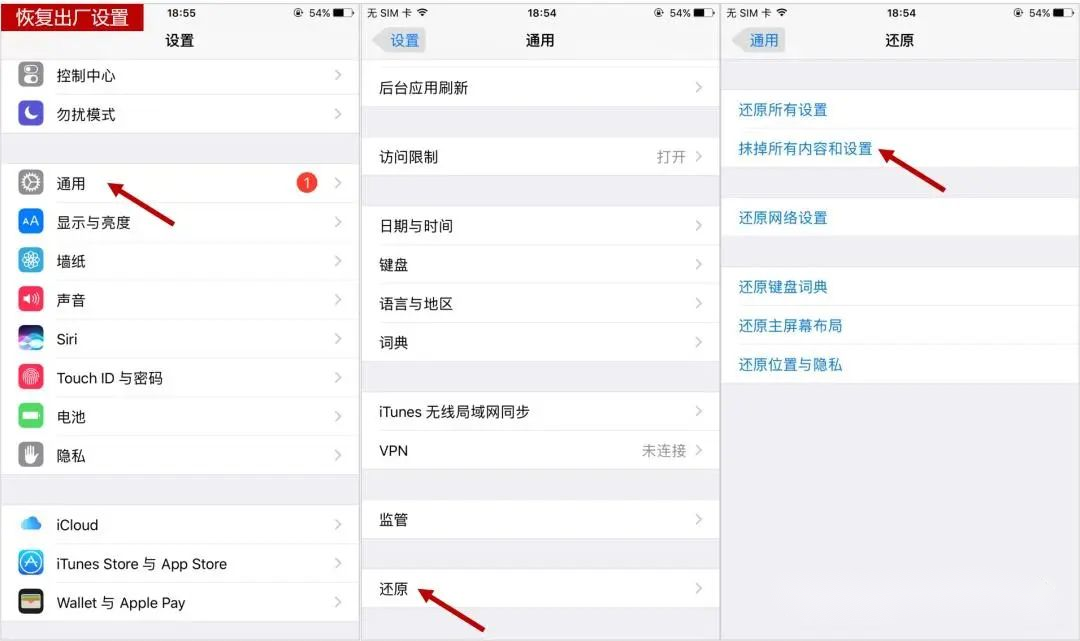
(2) Réinitialisation aux paramètres d'usine
Un téléphone d'occasion doit être réinitialisé aux paramètres d'usine, en effaçant tout le contenu et les réglages. Aucune information de carte SIM, document ou résidu de logiciel ne doit être conservé, car ces éléments peuvent être considérés par TikTok comme un environnement réseau non sécurisé.
Chemin : Réglages > Général > Transférer ou réinitialiser l'iPhone > Effacer contenu et réglages
(3) Réactivation du téléphone
Nous ne détaillerons pas cette étape ici, veuillez l'effectuer vous-même.
(4) Configuration du nœud
Si vous utilisez une carte étrangère, cette étape peut être ignorée. Sinon, vous devez obtenir l'accès au réseau étranger par des moyens légitimes.
(5) Paramètres de base
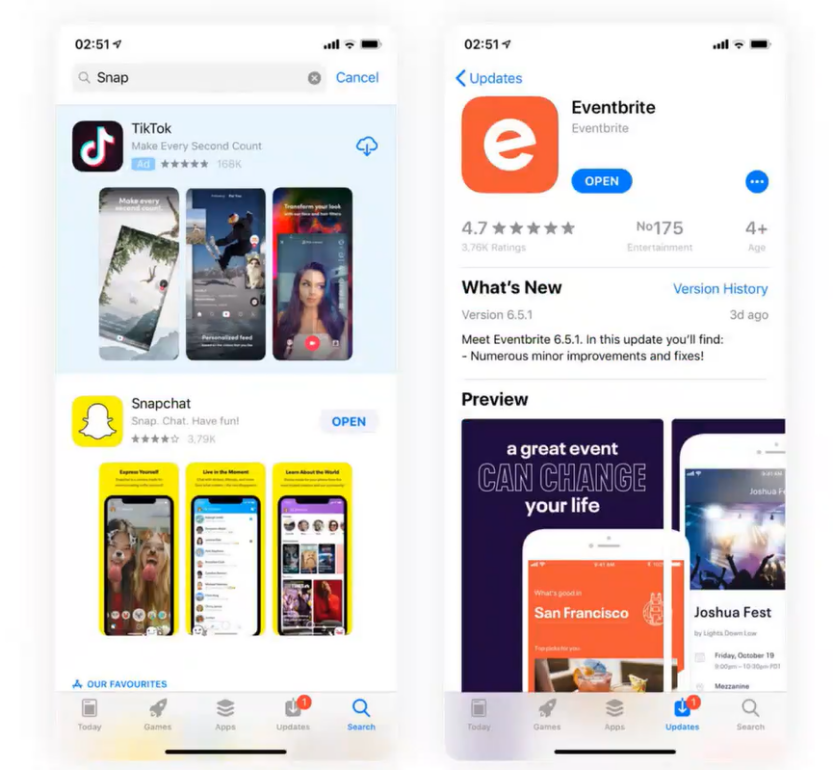
Configurez le fuseau horaire, la localisation, les publicités, la langue, etc., selon vos besoins, puis téléchargez le package d'installation de TikTok.
Le package d'installation peut être téléchargé depuis l'App Store ou via le navigateur Google Chrome.
II. Comment créer un compte TikTok
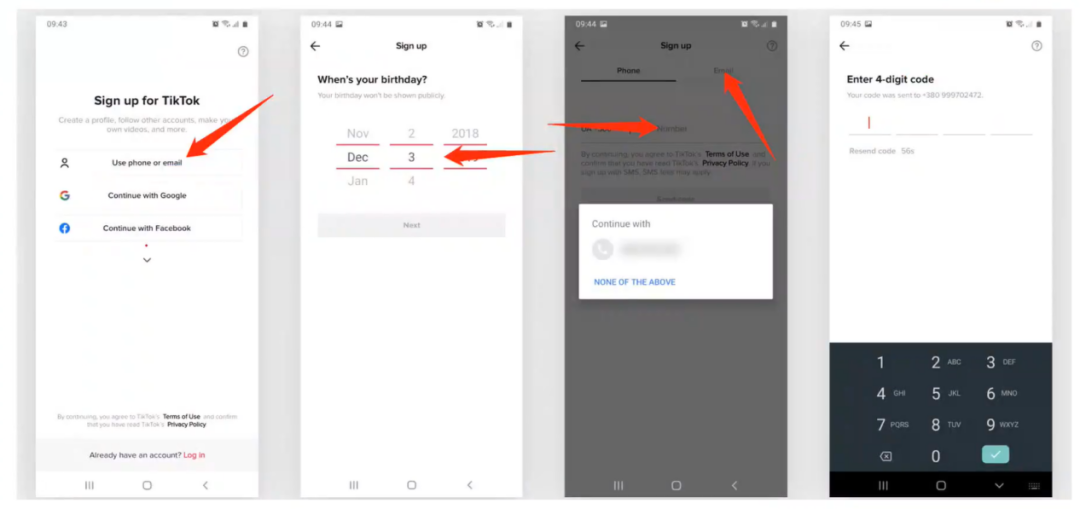
(1) Ouvrez TikTok, l'écran d'inscription apparaît, proposant de s'inscrire via numéro de téléphone, e-mail, compte Google ou d'autres plateformes tierces. Il est recommandé d'utiliser l'e-mail, et non les plateformes tierces.
(2) Lors de la saisie de la date de naissance, assurez-vous d'avoir plus de 18 ans.
(3) Selon votre méthode d'inscription, choisissez Phone ou Email pour recevoir le code de vérification.
Attention : soyez prudent lors de l'utilisation d'un nouveau compte Gmail ou d'autres e-mails pour vous inscrire à TikTok. Privilégiez les comptes que vous contrôlez, car il peut y avoir des problèmes de réception de code de vérification avec les nouveaux comptes.
III. Gestion de compte, sélection de produits, ouverture de boutique
Après avoir téléchargé et créé votre compte TikTok, vous pouvez commencer à gérer votre compte et publier des vidéos. La phase initiale implique un processus de « nourrissage » du compte. Pour gagner plus d'abonnés et de trafic, vous devez faire ce qui suit :
Définir le positionnement du compte : Choisissez un domaine qui vous intéresse et créez du contenu autour de ce domaine.
Publier du contenu de qualité : Les vidéos doivent être originales, intéressantes et utiles pour attirer les spectateurs.
Interagir activement : Suivez d'autres utilisateurs, likez et commentez, participez aux défis pour augmenter l'activité du compte.
Si vous souhaitez monétiser via TikTok, envisagez d'ouvrir une boutique pour vendre vos propres produits ou services.
Lors de la sélection de produits, tenez compte des facteurs suivants :
Le produit respecte-t-il les règles de la plateforme : Assurez-vous que votre produit ou service ne viole pas les règles de TikTok.
Le produit a-t-il une demande sur le marché : Choisissez des produits avec un large public cible et une forte demande.
Le produit est-il compétitif : Assurez-vous que votre produit a des avantages en termes de prix, qualité, etc.
Si vous êtes une entreprise B2B cherchant à se développer à l'international via TikTok pour obtenir plus de demandes de renseignements et de commandes, vous pouvez télécharger ce « Guide complet : la base de connaissances pratiques TikTok la plus complète et la plus puissante du web ». Il contient les dernières règles et astuces officielles de TikTok (zone américaine, Asie du Sud-Est, Europe, etc.), vous aidant à maîtriser rapidement diverses techniques de gestion de compte TikTok, à résoudre les problèmes de demandes de renseignements B2B et de trafic commercial transfrontalier, et à créer un compte à succès.
De plus, il est mis à jour 365 jours par an, avec un contenu riche et pratique !
Le lien du document est ci-dessous, servez-vous si besoin ~
https://ho3fx8mq91.feishu.cn/docx/HANVdZJipoFv3gxkd1qcofPWnTd