 2894
2894Comment télécharger la version internationale de TikTok sur iPhone ? C'est une question que se posent de nombreux utilisateurs d'iPhone en Chine qui souhaitent utiliser TikTok. En raison de certaines réglementations et restrictions, les utilisateurs chinois doivent suivre quelques étapes supplémentaires pour accéder à la version internationale de TikTok. Voici un guide détaillé de téléchargement et de configuration pour vous permettre de profiter pleinement de TikTok international.
I. Exigences matérielles pour télécharger TikTok international sur iPhone
Pour utiliser correctement TikTok international, votre iPhone doit répondre aux exigences matérielles suivantes :
1. iPhone 6 ou supérieur : il est recommandé d'utiliser un iPhone 7 ou une version ultérieure pour de meilleures performances et une expérience optimale.
2. iOS 9.3 ou supérieur : assurez-vous que votre version d'iOS est au moins 9.3.
3. Mémoire de 16 Go ou plus : pour une utilisation fluide de TikTok international, il est conseillé d'avoir au moins 16 Go de mémoire sur votre téléphone.
4. Pas besoin de carte SIM : TikTok international ne nécessite pas de carte SIM, vous pouvez utiliser le Wi-Fi pour vous connecter.
II. Configuration de l'iPhone
Avant de commencer à télécharger TikTok international, suivez ces étapes pour configurer votre iPhone :
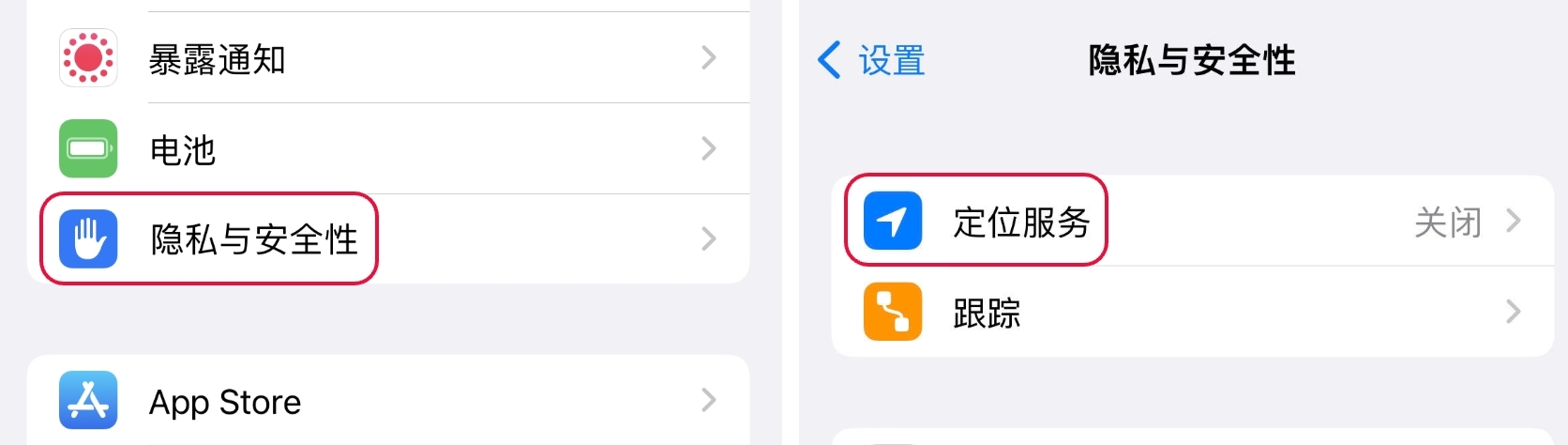
1. Désactiver les services de localisation : dans les paramètres du téléphone, trouvez [Services de localisation] et passez de [Activé] à [Désactivé], puis activez le suivi publicitaire limité (dans les paramètres de confidentialité).
2. Configurer la région, la langue et l'heure : dans les paramètres, allez dans [Général], puis sélectionnez [Langue et région]. Définissez la langue sur celle du pays cible et la région en conséquence. Par exemple, pour les États-Unis, réglez la langue sur Anglais et la région sur États-Unis. Ensuite, dans les paramètres de date et heure, désactivez la mise à jour automatique et sélectionnez manuellement le fuseau horaire du pays ou de la ville cible.
III. Connexion avec un identifiant Apple étranger
Avant de télécharger TikTok international, vous devez utiliser un identifiant Apple d'une autre région. Voici les étapes pour vous connecter avec un identifiant étranger :
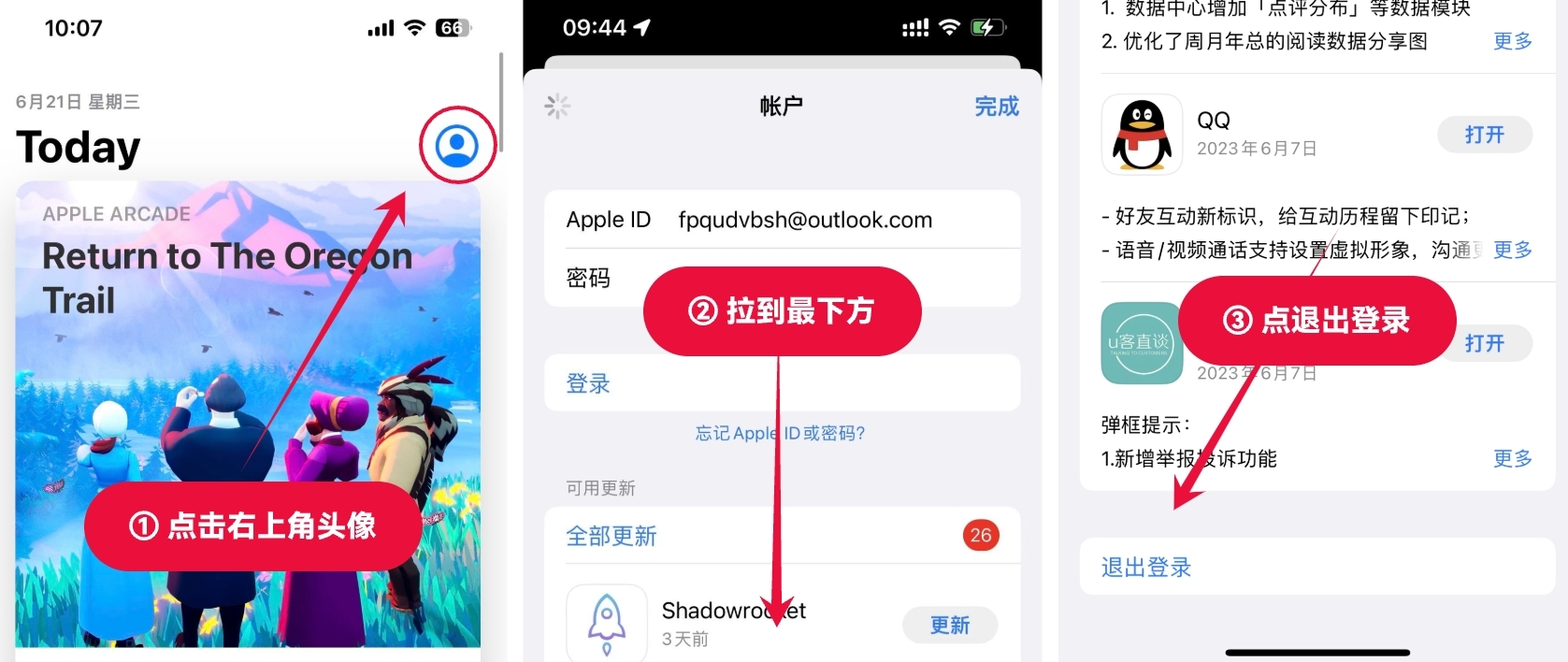
1. Déconnectez-vous de votre compte : dans l'App Store, appuyez sur l'icône en haut à droite, faites défiler vers le bas et déconnectez-vous de votre compte.
2. Changez pour un identifiant Apple étranger : vous pouvez acheter un identifiant étranger pour cela. Lors de la connexion, sélectionnez "Autres options" et assurez-vous de ne pas effectuer de mise à niveau.
Remarques importantes :
Ne vous connectez pas avec un identifiant étranger dans les paramètres.
Ne liez pas votre numéro de téléphone lors de la connexion avec l'identifiant pour garantir la sécurité.
Après avoir installé le "petit rocket", assurez-vous de vous déconnecter de l'identifiant étranger pour éviter que votre téléphone ne soit verrouillé.
IV. Téléchargement de TikTok à l'étranger
Enfin, suivez ces étapes pour télécharger TikTok à l'étranger :
1. Recherchez directement "TikTok" dans l'App Store.
2. Appuyez sur Télécharger et attendez la fin de l'installation.
Grâce à ce guide détaillé de téléchargement et de configuration, vous savez maintenant comment télécharger la version internationale de TikTok sur iPhone en Chine. Veuillez également respecter les réglementations et les normes communautaires, et profitez pleinement de la créativité et du plaisir dans le monde de TikTok !